ModsJava
Riftbone
I don't know my version or loader
Open the Minecraft launcher and look at the profile you play on — it names both, like fabric-loader-1.21.4. The version also shows in the bottom-right corner of the game's main menu.
No loader in the profile name? Then it's plain Minecraft, and these mods won't run — you need Fabric or NeoForge installed first.

Riftbone
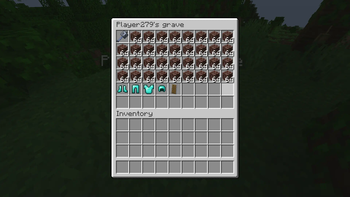
WARNING! Upgrading the mod between certain versions might be unsafe! Read changelog before updating! A simple grave / remains mod to keep your items safe and ready for recovery
A partial rewrite of Rift Realms Utility for 1.21.1
Graves
- Spawned on death.
- Disappear after a few seconds if emptied.
- Right-click to open their inventory and take the items out.
- Shift-right-click to take all the items from the grave into the slots they were previously in. (Quick looting)
- If the slot is filled, the item is placed in an empty one.
- If the inventory is full, the item is dropped on the ground.
- Float in water and lava, and stay at -64 when falling into the void.
Migration - ONLY WORKS ON v1.0.0
- Graves from Rift Realms Utility automatically change themselves into Riftbone graves when they are loaded.
- Rift Realm Utility should not be installed alongside Riftbone, if it ever becomes avaible on 1.21.1
Gamerules
ownerOnlyLooting: Allows only the owner of the grave to open the grave, by either method. Defaults to false.ownerOnlyQuickLooting: Allows only the owner of the grave to instantly loot the grave, by Shift-right-clicking. Defaults to true.quickLootingAllowed: Allows quick looting to happen. Defaults to true.
Quick facts
- Edition: Minecraft Java
- File type: .jar
- Minecraft versions listed: 26.1, 26.1.1, 26.1.2
- How to install: Install the matching mod loader (Forge, Fabric or NeoForge) for your Minecraft version. → Download the .jar. → Put it in the .minecraft/mods folder and launch that loader profile.
- Where to get it: Opens on Modrinth — not every file is mirrored on our own servers.
Install steps are the general flow for this file type — How to install Minecraft Java mods & modpacks walks through it step by step.
Verified by MCModsHub
- Ships as riftbone-1.2.1+26.1-beta.jar — drop this file into the mods folder
- Download size: 94 KB
- Download link checked 31 Aug 2026 — working
These come from our own check of the pack file, not from the source page.