
txt2book
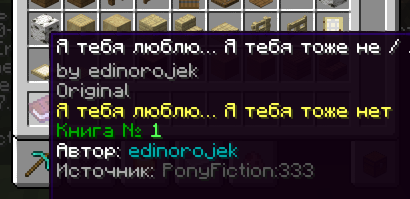
This mod allows you to import books or articles from supported websites and convert them into in-game Minecraft books.
Supported Websites:
- Telegraph (good)
- Ponyfiction (good)
- Ficbook (good with small texts)
- .docx documents (WIP)
You can set up a proxy in the config.
Check out my new mod - PxIgnis!
A server-side mod that enables Lua scripting in Minecraft! Instant hot reload, very simple but powerful API for prototyping game mechanics, custom mob AI, mini games, custom commands & everything that comes into your mind.
local arena = world:createRegion(vec(-50, 64, -50), vec(50, 80, 50))

arena:on("entity_enter", function(entity)
    if entity:isPlayer() then
        mc.broadcast(entity.name .. " entered the arena")

        coroutine.wrap(function()
            local res = mc.fetch("https://api.example.com/arena/log")
            if not res.ok then
                mc.broadcast("log failed: " .. res.error, true)
            end
        end)()
    end
end)
How to Use
To import a book, use the following command:
/txt2book <source> <workId> [signed]
Example:
/txt2book ponyfiction 333
This will import the story from ponyfiction.org/story/333 and give you a Minecraft book.
You can also specify whether the book should be signed (minecraft:written_book) or unsigned (minecraft:writable_book). By default, the book will be signed.
Examples:
/txt2book ponyfiction 333 true– Creates a signed book./txt2book ponyfiction 333 false– Creates an unsigned, writable book.
Finding workId:
- Ficbook:
ficbook.net/readfic/**10936980**→ Work ID is"10936980" - Ponyfiction:
ponyfiction.org/story/**220**→ Work ID is"220" - Telegraph:
telegra.ph/**Pikabu-Puls-August-2024-09-16**→ Work ID is"Pikabu-Puls-August-2024-09-16"
Docx importing (a little guide)
/txt2book docx "<url>" [writtenBook]
url is a link to the .docx file.
You can just send the file in Discord and copy the link to it.
How Chapters Work
Chapters are split by paragraph styles in the docx file.
Title - Sets the book title
Heading 1...9 - Starts a new chapter
Any other style - text
Example Structure
[Title] MY SUPER BOOK
[Heading 1] Everything goes good
But main hero dies
[Heading 1] Now everything is bad
And sad
Produces:
- Book title:
MY SUPER BOOK - Chapter 1:
Everything goes good— body text - Chapter 2:
Now everything is bad— body text
Admin Commands
/txt2book reload– Reloads the configuration./txt2book resetCache– Clears the book cache, allowing faster access to recently imported books.
Permissions
By default, all commands are restricted to server operators. You can adjust access using the permission system.
ru.pyxiion.txt2book– Permission to use the main command.ru.pyxiion.txt2book.ficbook– Permission to import books from Ficbook.ru.pyxiion.txt2book.ponyfictionru.pyxiion.txt2book.telegraphru.pyxiion.txt2book.docxru.pyxiion.txt2book.reload– Permission to reload the mod configuration.ru.pyxiion.txt2book.resetCache– Permission to reset the book cache.
Configuration
File: config/txt2book.toml
Parameters:
config_version— do not modify this value.lang— mod language. You can set "ru" or "en", or add your own language.maximum_file_size— maximum size for imported files.[characters],[characters.category],[characters.width]— system parameters.[langs.X]— messages for language X.
Language Support
The mod supports both English and Russian. You can select or add languages in the configuration file (txt2book.toml).
Some limitations
The mod does not support all possible letters. It filters them out if the mod doesn't know their size.
About docx importing
The first title in a document is considered the title of the book. All subsequent titles are chapter titles.
Plans
- Improve .docx importing
- Improve Ficbook importing
Let me know if you found a bug or have a suggestion, such as adding a new source.

- Edition: Minecraft Java
- File type: .jar
- Minecraft versions listed: 1.21, 1.21.1, 1.21.2
- How to install: Install the matching mod loader (Forge, Fabric or NeoForge) for your Minecraft version. → Download the .jar. → Put it in the .minecraft/mods folder and launch that loader profile.
- Where to get it: Opens on Modrinth — not every file is mirrored on our own servers.
Install steps are the general flow for this file type — How to install Minecraft Java mods & modpacks walks through it step by step.
- Ships as PxBooks-1.1.1.jar — drop this file into the mods folder
- Download size: 746 KB
- Download link checked 31 Aug 2026 — working
These come from our own check of the pack file, not from the source page.