
Bundle's Brilliance
Java mod listed for Minecraft 1.21. Downloads from the MC Java Mods app on Android.
I don't know my version or loader
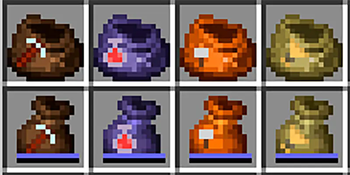
Bundle's Brilliance
Upgrade your inventory with bundles that specialize in different tasks!
Features
Bundle are auto picks items into them.
- Miner's Bundle: Stack up to 64 ores, blocks, and items related to mining.
- Farmer's Bundle: Stack up to 64 crops, seeds, and items related to farming.
- Builder's Bundle: Stack up to 64 building blocks, tools, and items related to building.(not properly implemented)
- Alchemist's Bundle: Stack up to 16 potions (Other later? any ideas?)
Installation
- Make sure you have Fabric / NeoForge installed
- Download the latest version of Fabric API / Forgified Fabric API and place it in your mods folder.
- Download Bundle's Brilliance
- Place the downloaded
.jarfile in your mods folder. - Run Minecraft with Fabric / NeoForge.
Usage
After installing the mod, you can find the new bundles in villager trades, loot tables, and as craftable items (if vanilla bundle is craftable). Explore the world and discover the bundles that will make your Minecraft experience more efficient and enjoyable.
Contributing
Contributions are welcome! If you have suggestions or want to contribute code or translations, please visit the GitHub repository.
License
This mod is available under the MIT License. See the LICENSE file for more details.
Credits
- VeiTr: Main Developer
Thank you for using Bundle's Brilliance!
- Edition: Minecraft Java
- File type: .jar
- Minecraft versions listed: 1.21, 1.21.1
- How to install: Install the matching mod loader (Forge, Fabric or NeoForge) for your Minecraft version. → Download the .jar. → Put it in the .minecraft/mods folder and launch that loader profile.
- Where to get it: Opens on Modrinth — not every file is mirrored on our own servers.
Install steps are the general flow for this file type — How to install Minecraft Java mods & modpacks walks through it step by step.
- Ships as bundles-brilliance-neoforge-0.1-v1.21.jar — drop this file into the mods folder
- Download size: 113 KB
- Download link checked 11 Oct 2026 — working
These come from our own check of the pack file, not from the source page.