
ElytraRenderFix
This mod fixes a bug in Minecraft's code that causes elytras to have a missingno texture when an item renders a trimmed armor piece AND an elytra via…
⬇ Download on Modrinth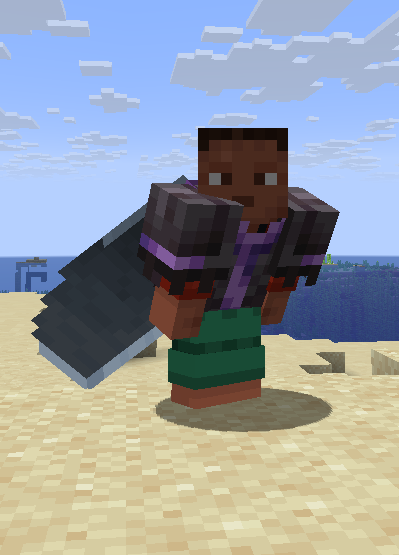
ElytraRenderFix
With the minecraft:equippable component, it is possible to determine the layers that an item renders when it is equipped. This mod fixes a bug that occurs when rendering a chestplate layer and an elytra together. If the chestplate has a trim, the Elytra has a missingno texture because Minecraft's rendering code tries to apply the trim to the Elytra layer. This mod fixes this bug by simply preventing the trims from being rendered on the Elytra layer (wings). This ensures that the chestplate, trim, and Elytra are rendered correctly.
Please note that mods requiring trims to render on top of the elytra (like Elytra Trim mods) might be incompatible with this one, since it skips part of the elytra rendering process. If you experience issues, try removing this mod first — that might already fix it.
For example, the following JSON code is an equipment model (see Minecraft Wiki). This specifies that any item with the corrosponding asset_id in the item component minecraft:equippable (see Minecraft Wiki) should render normal netherite armor on the humanoid and humanoid_leggings layers (armor layers for helmet, chestplate, leggings, and boots) and, in addition, an elytra on the wings layer (using the player's cape if available).
netherite_armor_with_elytra.json:
{
  "layers": {
    "humanoid": [
      {
        "texture": "minecraft:netherite"
      }
    ],
    "humanoid_leggings": [
      {
        "texture": "minecraft:netherite"
      }
    ],
	"wings": [
      {
        "texture": "minecraft:elytra",
        "use_player_texture": true
      }
    ]
  }
}
minecraft:equippable component of the item (here a netherite chestplate):
{
  "slot": "chest",
  "asset_id": "mynamespace:netherite_armor_with_elytra"
}
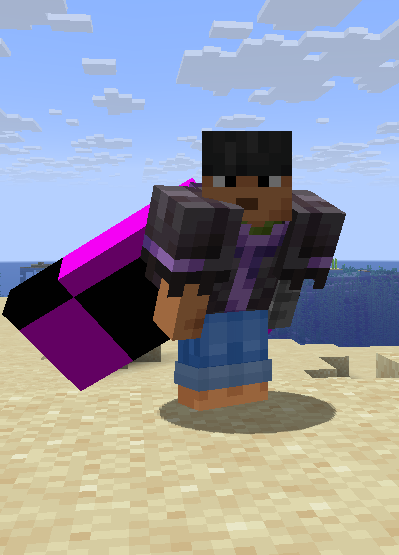
If this item now has an armor trim, Minecraft attempts to render the trim over the normal armor layer (humanoid / humanoid_leggings) as well as over the wings layer. However, since the wings layer cannot accept a trim, it receives a missingno texture in its entirety.
This mod does nothing more than prevent trims from being rendered on the wings layer. This way, armor with trim also works with such a resource pack. (See below for example)
 |
 |
|---|---|
| With the mod | Without the Mod |
(I had to create a new repository because I needed to set up a brand-new project for the major version update to 26.1, Click here for the old repo, the new one is linked via modrinth)
- Edition: Minecraft Java
- File type: .jar
- Minecraft version listed: 26.1
- How to install: Install the matching mod loader (Forge, Fabric or NeoForge) for your Minecraft version. → Download the .jar. → Put it in the .minecraft/mods folder and launch that loader profile.
- Where to get it: Opens on Modrinth — not every file is mirrored on our own servers.
Install steps are the general flow for this file type — How to install Minecraft Java mods & modpacks walks through it step by step.
- Ships as elytra-render-fix-1.2.jar — drop this file into the mods folder
- Download size: 27 KB
- Download link checked 21 Sept 2026 — working
These come from our own check of the pack file, not from the source page.