





Better Amethyst Polymerized
Better Amethyst Polymerized is a Filament-based mod. This mod is a Polymer port of Even Better Amethyst, seamlessly integrating a variety of new blocks into Minecraft using Filament.
Planned Additions:
- Amethyst Tools
- Amethyst Armor
- Amethyst Prism (like a pokeball but for villagers)
- Amethyst Furniture
- More Amethyst block variants and decorations
- Amethyst Chest (Maybe 😉)
Added Blocks:
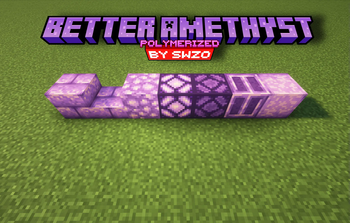
- Smooth Amethyst Crystal Block
- Chiseled Amethyst Crystal Block
- Amethyst Crystal Lamp
- Amethyst Bricks
- Amethyst Bricks Slab
- Amethyst Lamp
Features:
- Seamless Integration: Uses Filament to add and manage these new blocks effortlessly.
- Enhanced Aesthetics: Brings new textures and lighting options to enhance your Minecraft experience.
- Serverside: Use Polymer so no client side mods are required
- Compatibility: A polymer port of the popular Even Better Amethyst mod.
Note:
- Missing Blocks: Due to current limitations of Filament, the Amethyst Stairs and Amethyst Wall are not included in this version but may be added in future updates.
Dependencies:
Crafting Recipes (Spoiler):
Click to view crafting recipesAmethyst Brick Slabs:

Amethyst Bricks:

Amethyst Crystal Lamp:

Amethyst Lamp:

Chiseled Amethyst Block:

Smooth Amethyst Block:

How to Use:
- Install Filament and Polymer: Ensure you have Filament and Polymer installed and up to date.
- Install The Mod: Place the Better Amethyst Polymerized mod into the
modsfolder of your Minecraft world. - Load the Pack: Use Polymer's Autohost Feature to load the resourcepack into your world.
Credits:
- PatBox: For creating Polymer.
- Tomalbrc: For developing Filament and providing invaluable help and support during the creation of this mod
- FrozenHydrant: For the Even Better Amethyst mod that inspired this mod.
Quick facts
- Edition: Minecraft Java
- File type: .jar
- Minecraft versions listed: 1.21, 1.21.1
- How to install: Install the matching mod loader (Forge, Fabric or NeoForge) for your Minecraft version. → Download the .jar. → Put it in the .minecraft/mods folder and launch that loader profile.
- Where to get it: Opens on Modrinth — not every file is mirrored on our own servers.
Install steps are the general flow for this file type — How to install Minecraft Java mods & modpacks walks through it step by step.
Verified by MCModsHub
- Ships as betteramethyst-1.0.2+1.21-1.21.1.jar — drop this file into the mods folder
- Download size: 41 KB
- Download link checked 31 Aug 2026 — working
These come from our own check of the pack file, not from the source page.