BrandBlock
I don't know my version or loader
BrandBlock
Simple Fabric server-side mod to block certain client brands from joining your server
Configuration
config/brandblock.json
{
  "blockedBrands": [                             // All brands that will be blocked
    "forge",
    "vanilla"
  ],
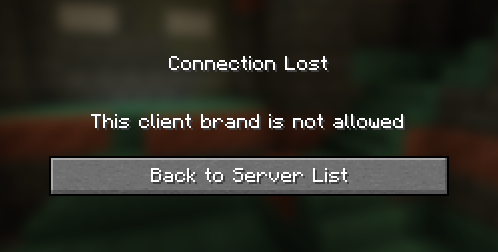
  "kickMsg": "This client brand is not allowed"  // The disconnection reason shown to the player, can be in Raw JSON text format
}
How it works?
When joining a server, during the configuration phase, both the server and client send a minecraft:brand custom payload packet (aka plugin message) containing the brand name. For unmodified clients and servers, this brand is always "vanilla." However, custom clients (such as Forge, Fabric, etc.) typically change this brand identifier.
This server-side mod listens when a brand payload is received and checks if it matches any blocked brands specified in the configuration file. If a blocked brand is detected, the player is disconnected from the server. However, this can be easily bypassed and modified clients may not to send this packet at all.
- Edition: Minecraft Java
- File type: .jar
- Minecraft versions listed: 1.20.5, 1.20.6, 1.21
- How to install: Install the matching mod loader (Forge, Fabric or NeoForge) for your Minecraft version. → Download the .jar. → Put it in the .minecraft/mods folder and launch that loader profile.
- Where to get it: Opens on Modrinth — not every file is mirrored on our own servers.
Install steps are the general flow for this file type — How to install Minecraft Java mods & modpacks walks through it step by step.
- Ships as brandblock-1.4.0+1.20.5.jar — drop this file into the mods folder
- Download size: 7 KB
- Download link checked 21 Sept 2026 — working
These come from our own check of the pack file, not from the source page.