
Simplify Tool Config Lib
Java mod listed for Minecraft 26.x. Downloads from the MC Java Mods app on Android.
⬇ Download on Modrinth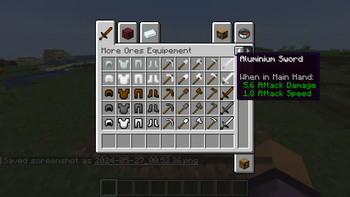
This mod library changes some Tools values to simplify Tools configuration. If your mod has tools or sword & other. With this mod, You need juste to put one value on each tool properties and restore some Minecraft tool values to "0". It's fix somme values ( int/ float) prevented giving precise values, mainly on "attack damage" value. You just put one value directly on your tool items of your choice without additionals values away in the code.
Example: on attack damage in default "1" and attack speed in default "4".
If you want to implements this mod in your mod, I have methods.
Directly implement -Go to Github and download java files and add on your project files and remap "imports".
Local Implementation -Download this mods and add in "build.gradle" file on section dependencies:
dependancies {
           modImplementation(fileTree("Local File Path"))
}
Example code to add:
Custom ToolMaterials:
//Minecraft version 1.20.1 method
public enum CustomToolMaterials implements FixToolMaterial {
CUSTOM( miningLevel, itemDurability, miningSpeed, enchantability, Ingredient)
...
Custom ToolItems (pretty much the code):
... CUSTOM_TOOL = register( "custom_tool" , new SimplifySwordItem( materials, float Damage, float Speed, new FabricItemSettings()));
//Minecraft version 1.20.6 method
public static CustomToolMaterials impleement Tier {
CUSTOM( BlocksTags... , durability, enchantementValue, Repair Ingredient);
...
Item CUSTOM_TOOL = register( "custom_tool", new Fix...Item( material, new Item.properties().attribute(Fix...Item.createAttributes(damage, speed))));
- Edition: Minecraft Java
- File type: .jar
- Minecraft version listed: 26.2
- How to install: Install the matching mod loader (Forge, Fabric or NeoForge) for your Minecraft version. → Download the .jar. → Put it in the .minecraft/mods folder and launch that loader profile.
- Where to get it: Opens on Modrinth — not every file is mirrored on our own servers.
Install steps are the general flow for this file type — How to install Minecraft Java mods & modpacks walks through it step by step.
- Ships as more-ores-1.1.0.jar — drop this file into the mods folder
- Download size: 29 KB
- Download link checked 12 Oct 2026 — working
These come from our own check of the pack file, not from the source page.