
dReconnect — Auto Reconnect for Servers
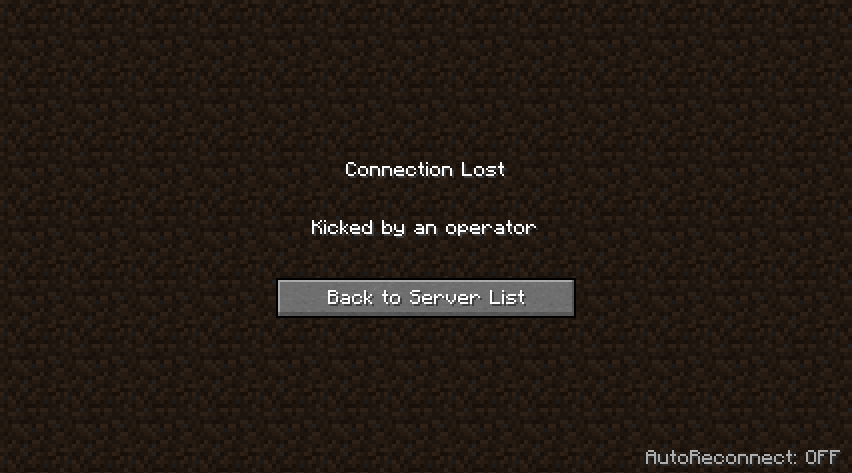
A small client mod for Architectury that adds a neat “autoreconnect” after being kicked from a server. An inconspicuous label appears in the lower right corner of the disconnect screen, and clicking it enables the auto-connect mode and starts a countdown.
Features
- An unobtrusive “AutoReconnect” switch on the disconnect screen.
- A countdown before the reconnect attempt (customizable).
- Instant on/off by clicking on the text.
- Quick hotkey: R (on the disconnect screen).
How it works
- After you're kicked from the server, there will be text at the bottom right:
- “AutoReconnect: OFF” - auto-reconnect is off.
- “AutoReconnect: ON” - auto-reconnect is on.
- “Reconnect in N…” - countdown to reconnect.
- Clicking on the text enables/disables autoreconnect; when enabled, the timer starts.
Settings
File: config/dreconnect.json
countdownSeconds— countdown time before reconnect
{
 "countdownSeconds": 3
}
Quick facts
- Edition: Minecraft Java
- File type: .jar
- Minecraft version listed: 1.20.1
- How to install: Install the matching mod loader (Forge, Fabric or NeoForge) for your Minecraft version. → Download the .jar. → Put it in the .minecraft/mods folder and launch that loader profile.
- Where to get it: Opens on Modrinth — not every file is mirrored on our own servers.
Install steps are the general flow for this file type — How to install Minecraft Java mods & modpacks walks through it step by step.
Verified by MCModsHub
- Ships as dreconnect-forge-1.0-ALPHA.jar — drop this file into the mods folder
- Download size: 14 KB
- Download link checked 21 Sept 2026 — working
These come from our own check of the pack file, not from the source page.