
StashFinder
Java mod listed for Minecraft 1.21. Downloads from the MC Java Mods app on Android.
StashFinder automatically indexes every chest you open and lets you instantly search for any item across all your chests — with distance, direction, and a…
⬇ Download on Modrinth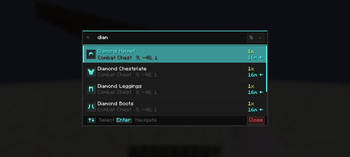
📦 StashFinder
Never forget where you stored it.
StashFinder automatically indexes every chest you open and lets you instantly search for any item across all your chests — with distance, direction, and a full slot preview.
🔍 How It Works
Open a chest → it gets silently recorded. That's it. No setup, no commands, no manual tagging.
When you need something, press F, type the item name, and StashFinder tells you exactly which chest has it and how far away it is. Press Enter and a 3D waypoint appears directly above the chest, guiding you straight there.
✨ Features
- 🔍 Instant Search — Press
F, type any item name, get results immediately - 📦 Auto Indexing — Every chest you open is recorded silently in the background
- 🗂️ Chest Records — Press
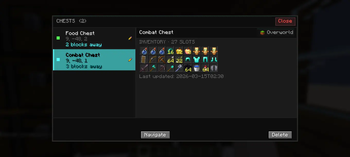
Gto browse all indexed chests with full slot-by-slot preview - 🧭 3D Waypoint — A floating label appears above the target chest in the world, scales with distance and fades on arrival. When off-screen, a directional arrow appears at the screen edge.
- 🔃 Sort Results — Sort by nearest, recently indexed, most items or alphabetical. Saved per world.
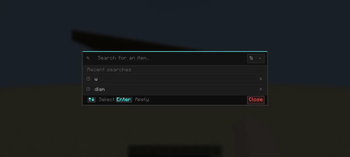
- 🕐 Search History — Recent searches shown when overlay is empty, re-apply with one click
- ✏️ Custom Names — Rename chests like "Weapons" or "Food Storage"
- 🌍 Dimension Aware — Overworld, Nether and End chests tracked separately
- 💾 Per-World Storage — Each world has its own index, nothing gets mixed up
- ⚙️ Settings Screen — Full in-game settings via Mod Menu — toggle indexing, adjust limits, configure notifications
- ⚡ Lightweight — Client-side only, no server required
🖼️ Screenshots


⌨️ Keybinds
| Key | Action |
|---|---|
F |
Open search overlay |
G |
Open chest records |
Keybinds can be changed in Options → Controls → Key Binds → StashFinder.
🌍 Languages
English · Turkish · and 7 more — applied automatically based on your Minecraft language setting.
🔧 Requirements
- Minecraft 1.21.11
- Fabric Loader
≥ 0.18.1 - Fabric API
❓ FAQ
Does this work on servers? Yes — StashFinder is client-side only. It works on any server without any server-side installation.
Does it support Barrels or Shulker Boxes? Not yet. Barrel, Shulker Box and Ender Chest support is planned for a future update.
Will it affect performance? No. Indexing happens only when you open a chest, and search runs entirely on cached local data.
🔮 Planned
- Barrel, Shulker Box and Ender Chest support
- Xaero's Minimap integration
- Chest categories and color tags
- Edition: Minecraft Java
- File type: .jar
- Minecraft version listed: 1.21.11
- How to install: Install the matching mod loader (Forge, Fabric or NeoForge) for your Minecraft version. → Download the .jar. → Put it in the .minecraft/mods folder and launch that loader profile.
- Where to get it: Opens on Modrinth — not every file is mirrored on our own servers.
Install steps are the general flow for this file type — How to install Minecraft Java mods & modpacks walks through it step by step.
- Ships as stashfinder-1.21.11-0.3.0+beta.3.jar — drop this file into the mods folder
- Download size: 2.0 MB
- Download link checked 12 Oct 2026 — working
These come from our own check of the pack file, not from the source page.