
Speedometer (1.17-1.21)
A lightweight, compass-style Speedometer item that visually tracks your movement speed. As you move faster, the needle advances across 32 frames and caps at frame 31.

Features
- Real-time speed display with a smooth 32-frame needle animation (
00→31) - Caps at max (frame
31) at high speeds - Lightweight + modder-friendly: simple item + model predicate, minimal moving parts
- Vanilla-friendly behavior (regular utility item)
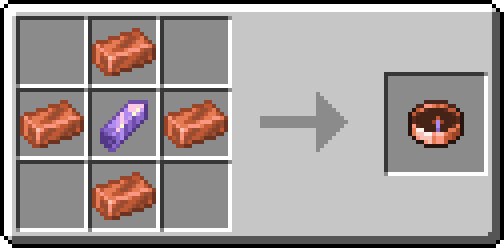
Crafting Recipe
Crafted like a Compass, but with Copper and Amethyst:

Future Plans
- Backport to older versions, all the way back to 1.17 as that was the Amethyst and Copper release.
- Support for all mod loaders 1.17-1.21: Fabric, Forge, NeoForge & Quilt
- Backport to even older versions using different items (possibly gold & lapiz?) and changing the textures to them as well. (SPEEDOMETER CLASSIC)
- Add a HUD mode (optional on-screen gauge) + keybind to toggle (client-only).
- Add units toggle (m/s, blocks/sec, km/h, mph) and show numeric speed in tooltip/actionbar.
- Add a config for scaling/cap (walking vs sprinting vs elytra), smoothing, and “max needle at X m/s”.
- Support vehicles (minecart/boat/horse) and optionally show mount speed instead of player velocity.
- Add sound/visual feedback (subtle click/tick at frame changes, optional).
- Add enchant/upgrade ideas: “Overclocked” (higher cap).
- Add redstone integration: a “Speed Monitor” block that outputs signal strength based on entity speed holding linked item.
- Add compat hooks (optional): trinket slot support, Curios/Trinkets compatibility, and better vehicle speed via common - APIs when present.
- Add translation keys + language files for proper tooltips and item group name.
- Add data-driven frames so texture frame count and thresholds can be changed via resource packs/datapacks.
Quick facts
- Edition: Minecraft Java
- File type: .jar
- Minecraft version listed: 26.1-snapshot-2
- How to install: Install the matching mod loader (Forge, Fabric or NeoForge) for your Minecraft version. → Download the .jar. → Put it in the .minecraft/mods folder and launch that loader profile.
- Where to get it: Opens on Modrinth — not every file is mirrored on our own servers.
Install steps are the general flow for this file type — How to install Minecraft Java mods & modpacks walks through it step by step.
Verified by MCModsHub
- Ships as speedometer-1.0.0+26.1-snapshot-2.jar — drop this file into the mods folder
- Download size: 53 KB
- Download link checked 31 Aug 2026 — working
These come from our own check of the pack file, not from the source page.