
ModsJava
ReplaceText Reborn
This mod allows you to replace any text sent by you in the chat. You can automatically replace profanity with nice words or shortcuts with full words.
⬇ Download on Modrinth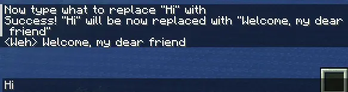
TextReplace Reborn Mod - Command Guide
The /replace command is used to manage word replacements in real-time.
Basic Syntax:
/replace <subcommand> [arguments]
List of Subcommands:
| Command | Description |
|---|---|
/replace add <word> |
Adds a new word to be replaced. You will be prompted to enter the replacement word in a separate message. |
/replace remove <word> |
Removes the specified word from the replacement list. |
/replace list |
Shows the list of all words that will be replaced. |
/replace reload |
Reloads the replacement list from the configuration file. Useful for applying manual changes made to the file. |
/replace help |
Shows a list of all available commands and their usage. |
/replace credits |
Displays information about the mod's developers and credits. |
Quick facts
- Edition: Minecraft Java
- File type: .jar
- Minecraft versions listed: 1.21, 1.21.1, 1.21.2
- How to install: Install the matching mod loader (Forge, Fabric or NeoForge) for your Minecraft version. → Download the .jar. → Put it in the .minecraft/mods folder and launch that loader profile.
- Where to get it: Opens on Modrinth — not every file is mirrored on our own servers.
Install steps are the general flow for this file type — How to install Minecraft Java mods & modpacks walks through it step by step.
Verified by MCModsHub
- Ships as replacetextreborn-1.21+_0.1.4.jar — drop this file into the mods folder
- Download size: 27 KB
- Download link checked 31 Aug 2026 — working
These come from our own check of the pack file, not from the source page.