
=================================================================================
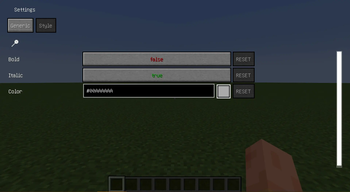
This mod allows you to customize the chat for more convenient work. Now you will not miss a private message because of its nondescript gray color or throw away an item because you did not notice how the chat window was closed during chatting.
Functional:
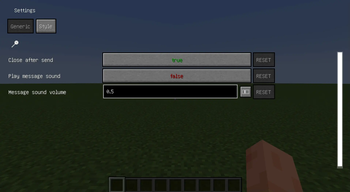
- Sound signal for private message
- Keep chat open after sending a message
- Customize the appearance of incoming messages: bold, italic, color
- Adjust sound notification volume
Requires a malilib
=================================================================================
Этот мод дает возможность настроить чат для более удобной работы. Теперь вы не пропустите личное сообщение из-за его невзрачного серого цвета или не выкинете предмет потому-что не заметили как окно чата закрылось при переписке.
Функционал:
- Звуковой сигнал при личном сообщении
- Оставлять чат открытым после отправки сообщения
- Настройка оформления входящих сообщений: жирный, курсив, цвет
- Настройка громкости звукового уведомления
Требует malilib
=================================================================================
- Edition: Minecraft Java
- File type: .jar
- Minecraft versions listed: 1.20, 1.20.1
- How to install: Install the matching mod loader (Forge, Fabric or NeoForge) for your Minecraft version. → Download the .jar. → Put it in the .minecraft/mods folder and launch that loader profile.
- Where to get it: Opens on Modrinth — not every file is mirrored on our own servers.
Install steps are the general flow for this file type — How to install Minecraft Java mods & modpacks walks through it step by step.
- Ships as chattwix-1.0.3-1.20.1.jar — drop this file into the mods folder
- Download size: 43 KB
- Download link checked 21 Sept 2026 — working
These come from our own check of the pack file, not from the source page.