
Tpa_QMZ
This mod provides a simple tp without needing their consent, and allows you to return.A Quick SOS system: press Left Alt to broadcast a signal with a…
⬇ Download on Modrinth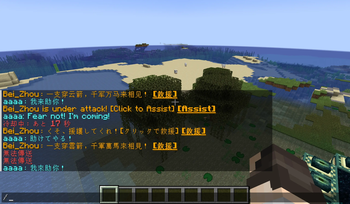
TpaQMZ Mod Overview
When you and your friend are thousands of miles apart, have you ever thought about using the tp command?
However, this requires cheat permission, which may make you worry about your friend cheating in the game.
This mod provides a seamless teleportation experience. Use /tpa to warp instantly and /back to return to previous locations or death points.
Its key feature is the Quick Rescue system: press a hotkey to broadcast an SOS signal, allowing friends to teleport and assist you immediately.
Command Reference
1. Teleportation Commands
/tpa ATeleports the executor directly to Player A./tpa A BTeleports Player A to Player B's location.
2. Back Commands
/backReturns the executor to their location prior to the last teleport./back deathReturns the executor to their last death coordinate.Tip:Return positions and Death positions are stored as independent data sets within the world save, allowing for repeated use.
3. Quick Rescue (SOS)
- Trigger: Activated via a hotkey (Default:
Left Alt). - Broadcast: Sends a global message: someone is under attack!
- Audio Feedback: All players will hear the vanilla firework launch sound as a notification.
- Interaction: Other players can simply click the message in the chat to teleport and assist.
- Constraints: Default 30s cooldown and 5m validity period.
4. Admin Configuration
/tpaConfig setCooldown <seconds>Sets the interval required between sending rescue requests (default: 30s)./tpaConfig setTimeout <minutes>Sets the duration for which a rescue request remains clickable (default: 5m)./tpaConfig dangerTp <true/false>Enables or disables "Dangerous Teleports."Tip:A teleport is considered "Dangerous" if the executor moves someone other than themselves. This includes forcing a player to warp to the executor's own location.
- Edition: Minecraft Java
- File type: .jar
- Minecraft version listed: 1.20.1
- How to install: Install the matching mod loader (Forge, Fabric or NeoForge) for your Minecraft version. → Download the .jar. → Put it in the .minecraft/mods folder and launch that loader profile.
- Where to get it: Opens on Modrinth — not every file is mirrored on our own servers.
Install steps are the general flow for this file type — How to install Minecraft Java mods & modpacks walks through it step by step.
- Ships as tpa_qmz-1.0.3-1.20.1.jar — drop this file into the mods folder
- Download size: 29 KB
- Download link checked 21 Sept 2026 — working
These come from our own check of the pack file, not from the source page.