
Hotkey Profiles
Hotkey Profiles is a client-side Fabric mod that lets you save your Minecraft keybinds as named profiles and switch between them instantly. Perfect for…
⬇ Download on Modrinth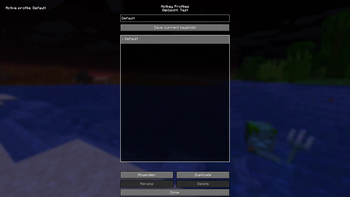
Hotkey Profiles is a client-side Fabric mod for Minecraft Java that lets you save your current keybind setup as named profiles and switch between them instantly. It’s ideal if you regularly change your controls for different activities such as PvP, building, redstone, Elytra flight, or creative work.
Features
- Save keybind profiles from your current controls at any time
- Apply profiles instantly (keybinds update immediately and your options are saved)
- Scrollable profile list that stays usable even with many profiles
- Duplicate profiles to create variants quickly
- Rename profiles (with safe handling of name collisions)
- Delete profiles (the Default profile is protected)
- Overwrite confirmation: if you try to save a profile name that already exists, the mod asks before overwriting
- Uses stable keybind identifiers (works with vanilla and modded keybinds as long as they use normal
KeyBindings)
How it works
The mod captures a snapshot of all registered keybindings and stores them in a profile:
- KeyBinding ID → bound key translation When you apply a profile, the mod restores those bindings, remaps keys, and writes the updated options file.
Usage
- Install Fabric Loader + Fabric API and add Hotkey Profiles to your
modsfolder. - Open Mod Menu → Hotkey Profiles.
- Enter a profile name and click Save.
- If the name already exists, you’ll be prompted to confirm overwriting it.
- Select any profile in the list and click Apply to switch.
Configuration / Storage
Profiles are stored as JSON in:
config/hotkeyprofiles.json
This makes it easy to back up your profiles or copy them between instances.
Compatibility
- Minecraft Java (Fabric)
- Client-side only (no server installation required)
- Compatible with most mods that register keybinds normally
Notes
- The Default profile is created automatically (if missing) and cannot be deleted or renamed.
- If a keybind no longer exists (e.g., a mod was removed), it is safely ignored when applying a profile.
If you encounter issues, please include your Minecraft version, Fabric Loader/Fabric API versions, and a crash log (if applicable).
- Edition: Minecraft Java
- File type: .jar
- Minecraft version listed: 1.21.11
- How to install: Install the matching mod loader (Forge, Fabric or NeoForge) for your Minecraft version. → Download the .jar. → Put it in the .minecraft/mods folder and launch that loader profile.
- Where to get it: Opens on Modrinth — not every file is mirrored on our own servers.
Install steps are the general flow for this file type — How to install Minecraft Java mods & modpacks walks through it step by step.
- Ships as hotkeyprofiles-1.0.0.jar — drop this file into the mods folder
- Download size: 33 KB
- Download link checked 31 Aug 2026 — working
These come from our own check of the pack file, not from the source page.