Metadata Wildcard for fabric-permissions-api
Java mod listed for Minecraft 26.x. Downloads from the MC Java Mods app on Android.
I don't know my version or loader
Metadata Wildcard for fabric-permissions-api





















LuckPerms supports wildcard permissions:
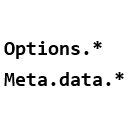
lp user <username> permission set luckperms.* true
But lacks wildcard support for metadata:
lp user <username> meta set some.mod.need.metadata.* 69
This fabric-permissions-api addon enables wildcard metadata resolution for any mod using the permissions API.
Synopsis
This mod works like when apply-wildcards= true and apply-sponge-implicit-wildcards= false
Download
Requirement
- Minecraft ⩾ 1.16.5
- Fabric
- fabric-permissions-api ⩾ 0.3.1
- Any permission mod supports fabric-permissions-api (e.g. LuckPerms)
Usage
For players
- Install the mod in your
moddirectory - Start your game/server once to generate config
- Edit
config/MetadataWildcard4fabric-permissions-api/prefix.txt
Default config:
minecraft.selector
When checking a key like minecraft.selector.foo.bar:
- First checks for an exact match
- If not found, checks parent keys with wildcards in descending order:
minecraft.selector.foo.*minecraft.selector.*
- Returns unset if no match is found
For modders
Add dependency in build.gradle:
// Optional dependency (users install manually)
modImplementation("top.qwertycxz:metadatawildcard4fabric-permissions-api:0.0.1")

// OR bundle with your mod
include(modImplementation("top.qwertycxz:metadatawildcard4fabric-permissions-api:0.0.1"))
Runtime Configuration
MetadataWildcard.prefixStrings.add("your.mod.metadata.prefix");
Equivalent to adding your.mod.metadata.prefix in prefix.txt.
Contributor
How could I contribute?
Issue and Pull-requests are both welcomed.
License
Apache 2.0 © qwertycxz
- Edition: Minecraft Java
- File type: .jar
- Minecraft versions listed: 26.1, 26.1.1, 26.1.2
- How to install: Install the matching mod loader (Forge, Fabric or NeoForge) for your Minecraft version. → Download the .jar. → Put it in the .minecraft/mods folder and launch that loader profile.
- Where to get it: Opens on Modrinth — not every file is mirrored on our own servers.
Install steps are the general flow for this file type — How to install Minecraft Java mods & modpacks walks through it step by step.
- Ships as unobfuscated.jar — drop this file into the mods folder
- Download size: 6 KB
- Download link checked 12 Oct 2026 — working
These come from our own check of the pack file, not from the source page.