
PermanentSnow
Java mod listed for Minecraft 26.x. Downloads from the MC Java Mods app on Android.
⬇ Download on Modrinth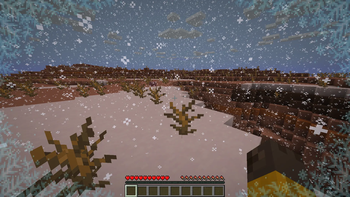
PermanentSnow
PermanentSnow allows you to change the appearance of the current weather client side. By default, it does nothing.
Configuration
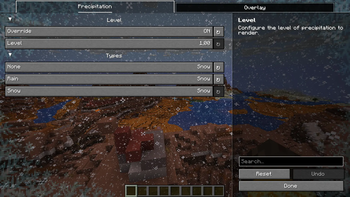
The configuration may be changed in-game using Mod Menu or by editing the configuration file directly. The configuration file is typically located at config/permanentsnow.json5 in your minecraft folder, the following settings are the default:
{
	// Override precipitation types to render as other precipitation types.
	overridePrecipitationTypes: {
		NONE: "NONE",
		RAIN: "RAIN",
		SNOW: "SNOW"
	},
	// Override the level of precipitation to render.
	overridePrecipitationLevel: false,
	// The higher the level of precipitation, the more intense the precipitation will be.
	precipitationLevel: 1.0,
	// The opacity of the powder snow overlay rendered by this mod.
	powderSnowOverlayOpacity: 0.0
}
FAQ
Does this mod give me unfair advantages over other players?
Not really, this mod only changes the visual appearance of the weather on the client side. It has no effect on gameplay or mechanics. In addition, most Minecraft players can already customize the appearance of weather particles.
Why is there no snow, although I set every precipitation type?
Make sure you also overwrite the precipitation level, as in some cases it may be too low!
Why does my game crash with this mod?
This mod is very simple and should not cause crashes if configured correctly. Try resetting the configuration in the file to the default settings. If you encounter crashes, please report them in the Issue Tracker!
Developers
If you add a custom type of precipitation client side, make sure to set the following translations:
config.permanentsnow.precipitation.group.types.option.<custom precipitation type>config.permanentsnow.precipitation.group.types.option.<custom precipitation type>.description
- Edition: Minecraft Java
- File type: .jar
- Minecraft version listed: 26.1
- How to install: Install the matching mod loader (Forge, Fabric or NeoForge) for your Minecraft version. → Download the .jar. → Put it in the .minecraft/mods folder and launch that loader profile.
- Where to get it: Opens on Modrinth — not every file is mirrored on our own servers.
Install steps are the general flow for this file type — How to install Minecraft Java mods & modpacks walks through it step by step.
- Ships as permanentsnow-1.2.4.jar — drop this file into the mods folder
- Download size: 16 KB
- Download link checked 12 Oct 2026 — working
These come from our own check of the pack file, not from the source page.