HomeJavaModsEasy Shop Mod
Easy Shop Mod
Easy Shop Mod — screenshot 1Easy Shop Mod — screenshot 2Easy Shop Mod — screenshot 3Easy Shop Mod — screenshot 4Easy Shop Mod — screenshot 5Easy Shop Mod — screenshot 6Easy Shop Mod — screenshot 7Easy Shop Mod — screenshot 8

📦 Easy-Shop-Mod – Official Description

🎯 Overview

Easy-Shop-Mod introduces a complete player-driven trading system in Minecraft, allowing each player to create and manage their own personal shop using a custom NPC (villager).

Other players can interact with these shops to browse and purchase items based on offers defined by the shop owner, creating a seamless and immersive trading experience within the game world.


📥 Download / Source

👉 GitHub Repository


⚙️ Core Features


/shop create (or /create_shop in Legacy Versions)

Legacy Versions

  • Minecraft 1.21.11 → Easy Shop Mod v7.1.7 and earlier
  • Minecraft 26.1.x → Easy Shop Mod v8.0.2 and earlier

Starting with versions released after the Legacy versions listed above, the command is /shop create.

Creates a new shop for the player.


/shop close (or /close_shop in Legacy Versions)

Legacy Versions

  • Minecraft 1.21.11 → Easy Shop Mod v7.1.7 and earlier
  • Minecraft 26.1.x → Easy Shop Mod v8.0.2 and earlier

Starting with versions released after the Legacy versions listed above, the command is /shop close.

Closes the current shop and removes the NPC from the world.


/shops

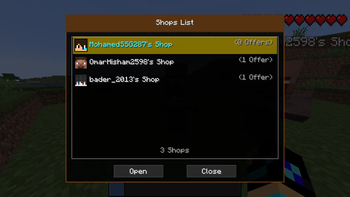
Opens a UI displaying all available shops along with the number of active offers.


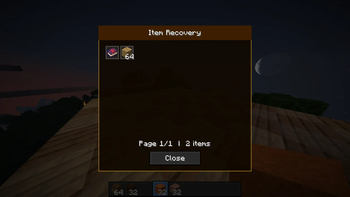
/shop recover

Allows a player to recover all items saved from a deleted shop.

Available starting from:

A recovery window will open containing:

This ensures that no items are lost after a shop has been deleted.


👑 Operator Commands

The following commands are Operator (OP) only.

Available starting from:


/shopadmin transfer <Old Owner Name> <New Owner Name>

Transfers ownership of a shop to another player.

Requirements:

When ownership is transferred:


/shopadmin delete <Player Name>

Deletes the specified player's shop.

This command:


👆 In-World Interaction

Right-clicking the shop NPC:


🌍 Language Support — Available from v7.1.4+


🧑‍🖼️ Player Skin Requirement (Important)

Starting from:

To ensure that your player face appears correctly in:

You must manually place your skin file in the following path:

\config\Easy Shop Mod\My Skin

📏 Skin Requirements

🖼️ Behavior

📂 Quick Folder Access (New)

Starting from:

If no skin is found, the chat message will display the path:

\config\Easy Shop Mod\My Skin

Clicking this path in the chat will automatically open the My Skin folder, allowing you to quickly place your skin file in the correct location.

Note: This clickable folder shortcut is only available in the versions listed above.

⚠️ This system is required for proper face rendering in these versions.


🖥️ User Interfaces

🧩 Shop Owner Interface

Allows full control over the shop:


🎒 Inventory Selection

Lets the player choose items from their inventory to sell.


🔎 Item Picker

Used to select any item in the game as a price:


🔢 Amount Input

Allows specifying the quantity required for the price.


🛒 Buyer Interface

Simple and user-friendly interface:


📦 Storage Interface

Displays all items received from trades:


💾 Data System

ShopData


ShopTrade


ShopManager


🌐 Network System

The mod uses a structured packet system to synchronize data:


🔒 Security & Validation


📊 Summary


✅ Conclusion

Easy-Shop-Mod provides a robust and user-friendly trading system that enhances multiplayer interaction in Minecraft. Players can easily create, manage, and interact with shops, making in-game trading more dynamic and engaging.

Quick facts

Install steps are the general flow for this file type — How to install Minecraft Java mods & modpacks walks through it step by step.

Verified by MCModsHub

These come from our own check of the pack file, not from the source page.

Explore more