
ModsJava
BannerHeads
BannerHeads is a Minecraft mod that allows players to right-click on banners to equip them as headgear. It works on both server and client sides, making…
⬇ Download on Modrinth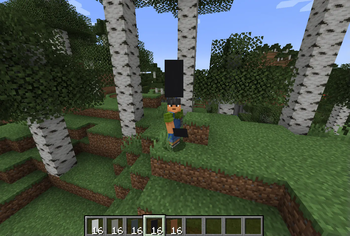
BannerHeads
BannerHeads is a Minecraft mod that allows players to right-click on banners to equip them as headgear. It works on both server and client sides, making it easy for multiplayer servers and single-player worlds alike.
Features
- Right-Click to Equip: Simply right-click any placed banner to equip it as headgear.
- Client & Server Compatibility: Works on both the client and server sides, ensuring compatibility with single-player and multiplayer.
- Seamless Integration: No complicated setup or crafting recipes—just grab a banner and put it on your head!
Installation
- Download the Mod: Grab the latest release from the BannerHeads Releases.
- Install Forge or Fabric:
- Make sure you have Minecraft Forge or Fabric installed on your client or server.
- Download the appropriate version from Minecraft Forge or Fabric.
- Move the Mod to Mods Folder:
- Place the
BannerHeads.jarfile into your Minecraftmodsfolder.- For client-side, navigate to
.minecraft/mods. - For server-side, place the file in your server's
modsdirectory.
- For client-side, navigate to
- Place the
- Launch Minecraft: Start Minecraft with Forge or Fabric to load the mod.
Compatibility
- Minecraft Versions: Compatible with Minecraft 1.20.4 and above.
- Multiplayer Support: Fully compatible with multiplayer servers.
How to Use
- Find or craft a banner.
- Right-click the banner to equip it as a helmet.
- Show off your style to your friends!
Enjoy equipping your banners with BannerHeads! 🎉
Quick facts
- Edition: Minecraft Java
- File type: .jar
- Minecraft version listed: 1.20.4
- How to install: Install the matching mod loader (Forge, Fabric or NeoForge) for your Minecraft version. → Download the .jar. → Put it in the .minecraft/mods folder and launch that loader profile.
- Where to get it: Opens on Modrinth — not every file is mirrored on our own servers.
Install steps are the general flow for this file type — How to install Minecraft Java mods & modpacks walks through it step by step.
Verified by MCModsHub
- Ships as BannerHeads-1.7-1.20.4.jar — drop this file into the mods folder
- Download size: 174 KB
- Download link checked 31 Aug 2026 — working
These come from our own check of the pack file, not from the source page.