
ApiumRadio
Java mod listed for Minecraft 1.20. Downloads from the MC Java Mods app on Android.
Immerse yourself in a world of high-fidelity streaming radio with realistic 3D spatial audio, multi-speaker surround sound systems, and interactive…
⬇ Download on Modrinth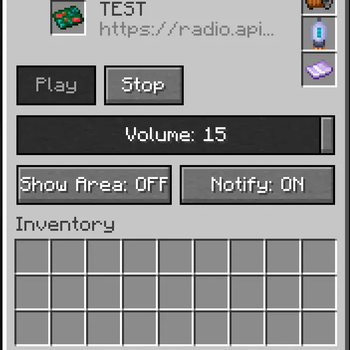




📻 Apium Radio - Next-Gen Streaming Radio for Minecraft
Apium Radio brings real internet radio streaming into Minecraft with a level of immersion and technical sophistication never seen before. Forget about simple "jukeboxes" — this is a fully simulated audio system with 3D sound, multi-speaker networks, and realistic physics.
✨ Key Features
🎵 True Streaming Audio
- Real-time MP3 Streaming: Listen to any internet radio station or MP3 stream directly in-game.
- Built-in Decoder: No external libraries or codecs required on the client side. It just works.
- High-Fidelity Audio Engine: Custom-built audio engine with 64KB buffering and per-sample volume interpolation for crystal clear sound without crackling or lag.
🔊 Advanced 3D Audio System
- Spatial Audio: Sound is accurately positioned in 3D space. Walk around the radio, and you'll hear the sound pan from left to right.
- Realistic Falloff: Volume fades naturally with distance.
- Occlusion: Walls and obstacles muffle the sound, just like in real life.
- Multi-Source Mixing: Connect multiple speakers, and the mod will intelligently mix the audio sources to create a seamless surround sound experience. No "jumping" sound when moving between speakers!
📡 Network & Speakers
- Expand Your Range: Connect Speakers to your Radio to extend the broadcast area to other rooms or even outside.
- Daisy-Chaining: Speakers act as cables! Chain them together to cover huge areas.
- Individual Control: Rename speakers and adjust their volume individually via a dedicated GUI. Create zones with different volume levels!
- Cables: Use Audio Cables to connect components neatly.
⚡ Realistic Mechanics
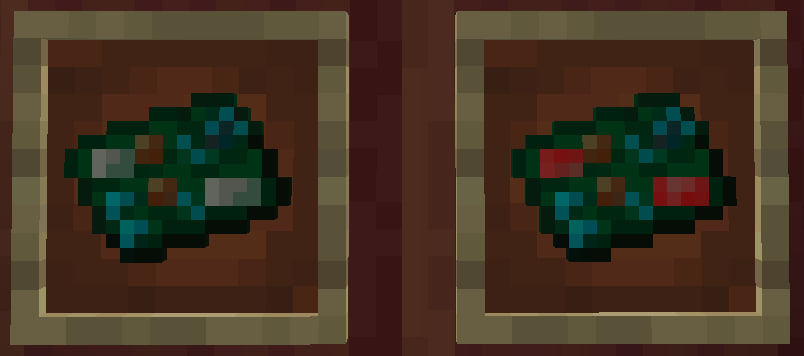
- Component System: The Radio isn't a magic block. You need to craft and install 3 essential components:
- Magnetic Coil
- Vacuum Tube
- Crystal Resonator
- Antenna Requirement: You must place a Lightning Rod (or configured block) on top of the radio to receive a signal.
- Lightning Hazard: If lightning strikes your antenna, your radio might fry! Components can burn out, and connected speakers might overload. Protect your equipment!
🖥️ Modern UI
- Vanilla-Style GUI: Clean, intuitive interface that fits perfectly with the game's aesthetic.
- Tabs: Easily switch between Main controls and Speaker management.
- Status Indicators: Clear visual feedback on connection status, errors, and missing components.
🛠️ Installation
- Install Minecraft Forge for 1.20.1.
- Drop the
apiumradio-x.x.x.jarinto yourmodsfolder. - Launch the game and craft your first Radio!
🎮 Getting Started
- Craft a Radio and place it down.
- Place an Antenna (Lightning Rod) on top of it.
- Insert Components: Open the GUI and place the Coil, Lamp, and Resonator in their slots.
- Tune In: Enter a stream URL (e.g., a direct MP3 link) and hit Play.
- Expand: Craft Speakers and Cables to set up a sound system for your entire base.
🔧 Configuration
The mod is highly configurable via apiumradio-common.toml:
- Max Speakers: Limit the number of speakers per radio (Default: 32).
- Default URL: Set a default station for new radios.
- Antenna Block: Change which block acts as an antenna.
Apium Radio is the only up-to-date, feature-rich radio mod for modern Minecraft versions. Experience music like never before!
- Edition: Minecraft Java
- File type: .jar
- Minecraft versions listed: 1.20.1, 1.20.2, 1.20.3
- How to install: Install the matching mod loader (Forge, Fabric or NeoForge) for your Minecraft version. → Download the .jar. → Put it in the .minecraft/mods folder and launch that loader profile.
- Where to get it: Opens on Modrinth — not every file is mirrored on our own servers.
Install steps are the general flow for this file type — How to install Minecraft Java mods & modpacks walks through it step by step.
- Ships as apiumradio-1.1.0-rf1.jar — drop this file into the mods folder
- Download size: 292 KB
- Download link checked 12 Oct 2026 — working
These come from our own check of the pack file, not from the source page.