
Equestrian Extras
Java mod listed for Minecraft 1.19. File opened and checked on 19 Oct 2026; downloads from the MC Java Mods app on Android.
I don't know my version or loader
Equestrian Extras
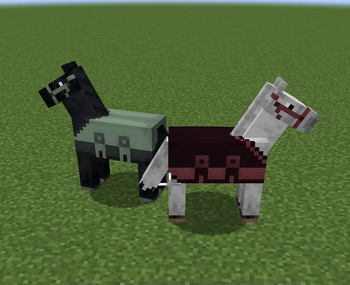
Equestrian Extras is a mod for Minecraft (Fabric) that adds some horse related content. I thought Minecraft needed more horse related mods, especially for Fabric, so this was my attempt at making that happen.
It is currently only available for 1.17.1 and 1.18 with an alpha version available for 1.19, but later versions are planned if I find the time.
Features
-
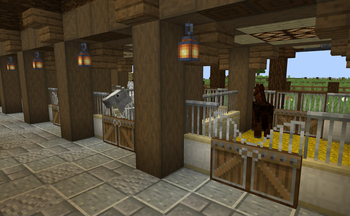
The Stable and Pasture creative tab includes horse blankets, halters and various blocks for building stables and pastures (such as metal gates and sliding doors).
- Horse blankets and halters - worn in the horse armor slot and can be dyed any color like normal leather horse armor.
- Saddle Racks (all wood types) - can be placed on the ground or against walls and can hold saddles.
- Sliding and Dutch Doors (all wood types)
- Stable Panels and Bars (all wood types) - can be centered by holding the sneak key while placing or interacting with the block.
- Straw Bedding - stacks like snow layers.
- Thatch blocks, slabs and stairs
- White Gates and Fences
- Iron Gates (16 colors)
- Double-wide Gates (wood and iron variants)
-
Tack - worn in the horse armor slot and can be dyed any color.
- Saddle Pad (English)
- Jumping Tack
- Racing Tack
- Western Tack
- Open Barding
- Wearable Ribbon
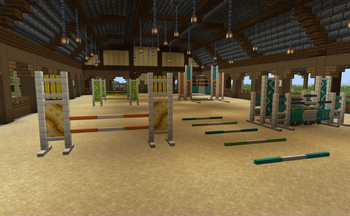
Short fences (all wood types + white) - for designing dressage arenas or (when extended upwards) racecources.
Dressage letters (8 letters) - these have a flat item texture so they work well in item frames as well as in block form.
- Standards (16 colors) - connect upwards for modular designs.
- Vertical Rail
- Horizontal Rail
- Panel
- Fancy Panel - these, like glazed terracotta, have connecting patterns with placement direction relative to the player.
- Poles
- Colored Poles (16 colours)
- Log Poles (larger poles with log and stripped log variants)
-
Both types of poles can be placed at multiple heights and may be knocked over (broken) when hit by a ridden entity.
- Poles are placed like slabs (single or double).
- Poles can be shifted up and down by right-clicking them with an empty hand for more height options.
- Sneaking while placing a pole will place it in the lowest position.
- Poles have a (configurable) chance to be broken when hit by a ridden entity.
- Poles emit a redstone signal when they are hit by a ridden entity.
- Fillers (16 colors)
- Ladder
- Panel
Flags (16 colours) - are normally centered when placed but will move to the side when placed on jump standards.
Barrels (16 colors) - placed like slabs and have a (configurable) chance to be knocked over (broken) when hit by a ridden entity.
- A random number between 0 and 1 is generated as a random weight so the initial foal stat can be anywhere between the two parent stats.
- A random number between the max and min percentage of the base vanilla stat is generated as a bonus to be added to the foal's stat.
- The actual calculation is:
foalStat = ((parent1Stat)*randomWeight) + (parent2Stat*(1-randomWeight)) + bonus - Finally, the stat is checked to make sure it is between the max and min allowed stats. If the new stat is too high or too low, it is set equal to the max or min value it goes past.
Altered horse breeding and pole/barrel break chance can be configured using the cloth-config mod.
Installation
Equestrian Extras is a Fabric mod, so it requires the Fabric Loader. Once you have installed the Fabric Loader, you can place Equestrian Extras and its dependencies into your mods folder like any other mod.
More detailed instructions on how to install mods can be found on the Fabric wiki.
Dependencies
- Fabric Loader
- Fabric API
- Cloth Config
- Mod Menu
- Dyed (optional) - enables more tack variants
- Edition: Minecraft Java
- File type: .jar
- Minecraft versions listed: 1.19, 1.19.1, 1.19.2
- How to install: Install the matching mod loader (Forge, Fabric or NeoForge) for your Minecraft version. → Download the .jar. → Put it in the .minecraft/mods folder and launch that loader profile.
- Where to get it: Opens on Modrinth — not every file is mirrored on our own servers.
Install steps are the general flow for this file type — How to install Minecraft Java mods & modpacks walks through it step by step.
- Ships as equestrian-extras-1.19-1.0.1-alpha.jar — drop this file into the mods folder
- Download size: 1.8 MB
- Download link checked 12 Oct 2026 — working
These come from our own check of the pack file, not from the source page.