
Played
Played is a lightweight Fabric mod that tracks local playtime for singleplayer worlds and multiplayer servers, with a total playtime display and optional…
⬇ Download on Modrinth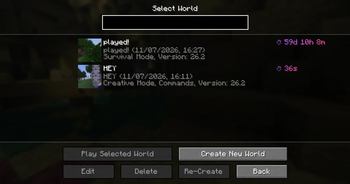
Played




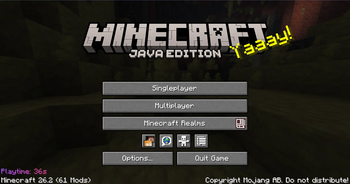
Played is a lightweight, client-side Fabric mod that tracks how long you play in each singleplayer world and on each multiplayer server. It also keeps a combined all-time total and displays your playtime directly in Minecraft's existing menus.
All data stays on your device. Played does not require installation on the server and does not upload or synchronize your statistics.
Features
- Tracks playtime separately for every singleplayer world
- Tracks playtime separately for every multiplayer server address
- Keeps a combined all-time total across worlds and servers
- Shows playtime in the singleplayer world list and multiplayer server list
- Shows total playtime on the title screen
- Can show the current world or server playtime in the pause menu
- Can show an optional playtime HUD while playing, with four selectable screen corners, adjustable size and offsets, and an optional background
- Provides the client-side
/playedcommand for session, current, and all-time statistics - Provides
/played session,/played current, and/played totalshortcuts - Supports optional AFK detection with a configurable timeout
- Pauses tracking while Minecraft itself is paused
- Can sort world and server lists by playtime in ascending or descending order
- Offers verbose, compact, and clock-style time formats
- Supports separate MiniMessage templates for lists, the title screen, and the pause menu
- Supports gradients and the
{time},{session},{current}, and{total}placeholders in display templates - Offers an optional translucent background behind list playtime text
- Places list text responsively around scrollbars and narrow screens
- Keeps title-screen and pause-menu text away from existing bottom-left text where possible
- Adds optional reset buttons to the Edit World and Edit Server screens
- Lets world tracking, server tracking, and every display location be enabled separately
Configuration
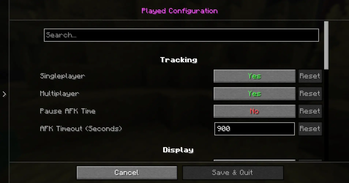
When Mod Menu is installed, Played provides an in-game configuration screen powered by Cloth Config.
Available settings include:
- Singleplayer and multiplayer tracking
- AFK pausing and AFK timeout
- World-list and server-list playtime displays
- Optional list backgrounds
- Title-screen and pause-menu displays
- Optional HUD display, background, anchor corner, size, horizontal and vertical offsets, and template
- World and server reset buttons
- Ascending, descending, or disabled playtime sorting
- Verbose, compact, or clock time formatting
- Custom list, title-screen, pause-menu, and HUD templates
The HUD is disabled by default, so updating Played does not add a new permanent overlay unless it is explicitly enabled.
Individual world or server playtime can be reset from its edit screen with the compact ⏱ button. A confirmation dialog prevents accidental resets.
Without Mod Menu, Played continues to track and display playtime normally. Its properties file can still be edited manually while Minecraft is closed.
Reliable Local Storage
Played saves data periodically and whenever tracking pauses, the active world or server changes, a connection closes, or the client shuts down.
Writes use temporary replacement files instead of truncating existing data. Before an existing file is replaced, Played creates a .bak backup and can recover from that backup if the primary file becomes unreadable. Older storage layouts are migrated automatically, including recovery from an interrupted partial migration.
Server addresses are normalized consistently, so capitalization does not create duplicate entries. Renaming a saved server keeps its accumulated playtime.
Storage Locations
Each singleplayer world's playtime is stored inside that world:
saves/<world>/Played/playtime.properties
The combined all-time total is stored at:
Played/alltime.properties
Multiplayer server playtime is stored at:
Played/server.properties
Configuration is stored at:
config/Played/config.properties
Updating
Existing world, server, total-playtime, and configuration data remain compatible when updating from previous Played versions. Replace only the old mod JAR; do not delete the Played or config/Played directories.
Requirements
- Minecraft 26.2
- Java 25 or newer
- Fabric Loader 0.19.3 or newer
- Fabric API
- Cloth Config
Optional
- Mod Menu, for convenient access to the in-game configuration screen
- Edition: Minecraft Java
- File type: .jar
- Minecraft version listed: 26.2
- How to install: Install the matching mod loader (Forge, Fabric or NeoForge) for your Minecraft version. → Download the .jar. → Put it in the .minecraft/mods folder and launch that loader profile.
- Where to get it: Opens on Modrinth — not every file is mirrored on our own servers.
Install steps are the general flow for this file type — How to install Minecraft Java mods & modpacks walks through it step by step.
- Ships as played-26.7.0.jar — drop this file into the mods folder
- Download size: 768 KB
- Download link checked 31 Aug 2026 — working
These come from our own check of the pack file, not from the source page.