

EN
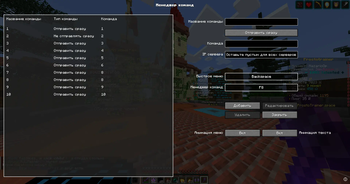
A convenient menu for interacting with players at the press of a key
{me} is being replaced by your nickname.
{player} or {name} is replaced by the nickname of the selected player.
- Types of commands:
• Send immediately: Executes the command immediately.
• Do not send immediately: inserts a command into the chat.
• Copy Command: Copies the command to the clipboard.
• Send and Copy Name: Sends the command and copies the player's name to clipboard.
RU
Меню действий с игроками, открываемое по нажатию клавиши
{me} заменяется на ваш никнейм.
{player} или {name} заменяется на никнейм выбранного игрока.
- Типы команд:
• Отправить сразу: выполняет команду сразу.
• Не отправлять сразу: вставляет команду в чат.
• Копировать команду: копирует команду в буфер обмена.
• Отправить и скопировать ник: отправляет команду и копирует ник игрока.
- Edition: Minecraft Java
- File type: .jar
- Minecraft version listed: 1.21.11
- How to install: Install the matching mod loader (Forge, Fabric or NeoForge) for your Minecraft version. → Download the .jar. → Put it in the .minecraft/mods folder and launch that loader profile.
- Where to get it: Opens on Modrinth — not every file is mirrored on our own servers.
Install steps are the general flow for this file type — How to install Minecraft Java mods & modpacks walks through it step by step.
- Ships as PlayerQuickMenu-1.21.11-1.6.1.1.jar — drop this file into the mods folder
- Download size: 116 KB
- Download link checked 31 Aug 2026 — working
These come from our own check of the pack file, not from the source page.