
Mob HP Display
Java mod listed for Minecraft 1.21. Downloads from the MC Java Mods app on Android.
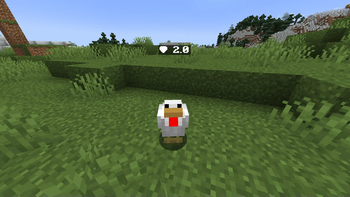
Mob HP Display is a lightweight client-side mod for 1.21.1 that shows mob health above their heads. My first-ever mod-simple and useful. No keybinds, no…
⬇ Download on Modrinth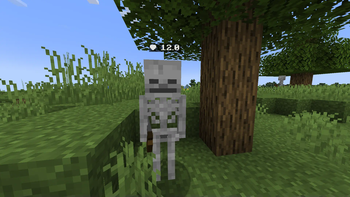

🧠 About
Mob HP Display is a small, client-side Fabric mod that shows the health of mobs floating above their heads. It's designed to be clean, useful, and performance-friendly — perfect for survival, PvE, or farming setups.
⚠️ Note: This is my very first Minecraft mod. I had no idea how to code when I started this — so while it works great, there may still be some wankiness. Feedback is super welcome!
✨ Features
- 🔍 Health shown when mobs are nearby (up to 6 chunks away)
- 🧱 Positioned not so cleanly above the head
- 🧠 Minimalist design, easy to read without cluttering your screen
- ⚙️ No config needed, just install and play
- 🛡️ Client-side only — doesn’t affect servers or other players
- ⚡ Lightweight — optimized for FPS, with no noticeable performance hit
🛠️ Why I Made This
It started as an experiment, and I ended up learning a lot about Minecraft modding, mixins, rendering, and gradle.build.
💬 FAQ
❓ Will other players see the HP? Nope. It’s client-side only, so just you.
❓ Does it work with modded mobs? Yes! As long as the mob is a
LivingEntity, the mod will display its health.
❓ Is it configurable? Not yet! It’s super basic for now — but maybe I’ll add a config later if people are interested.
❤️ Support / Feedback
If you find bugs or have ideas, I’d love to hear them! This project is mostly me learning as I go — but I want to keep improving it.
- Edition: Minecraft Java
- File type: .jar
- Minecraft version listed: 1.21.1
- How to install: Install the matching mod loader (Forge, Fabric or NeoForge) for your Minecraft version. → Download the .jar. → Put it in the .minecraft/mods folder and launch that loader profile.
- Where to get it: Opens on Modrinth — not every file is mirrored on our own servers.
Install steps are the general flow for this file type — How to install Minecraft Java mods & modpacks walks through it step by step.
- Ships as mobhpdisplay-1.0.0.jar — drop this file into the mods folder
- Download size: 12 KB
- Download link checked 1 Nov 2026 — working
These come from our own check of the pack file, not from the source page.