
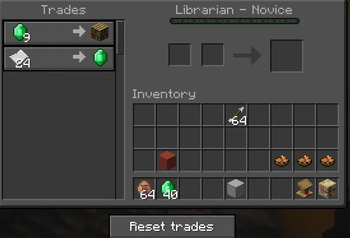


Villager Trade Reset
Villager Trade Reset is a lightweight Fabric mod that allows you to reroll a villager's trades before making any purchase.
Features
- Reset button — A "Reset trades" button appears directly in the villager trading interface
- Keybind — Press R (configurable in Options > Controls > Villager Reset) to reset trades without clicking
- Visual feedback — Happy villager particles and sound play on successful reset
- Fair play rules — Reset is only available if the villager has never traded (0 XP, 0 uses on all offers). Once a trade has been made, the button disappears permanently for that villager
- Cooldown — A 2-second cooldown between resets prevents spam
- Multiplayer ready — All logic is handled server-side, safe to use on multiplayer servers
How to use
- Right-click a villager with a valid profession
- Click "Reset trades" or press R
- The villager's trades will be rerolled instantly
- Repeat until you find the trades you want — as long as you haven't bought anything!
Requirements
- Minecraft 26.1.2
- Fabric Loader 0.19.2+
- Fabric API 0.146.0+
Notes
- Does not work on Nitwit or unemployed villagers
- Reset is permanently blocked once the villager has gained XP from a trade
- Works in both singleplayer and multiplayer
Quick facts
- Edition: Minecraft Java
- File type: .jar
- Minecraft versions listed: 26.1, 26.1.1, 26.1.2
- How to install: Install the matching mod loader (Forge, Fabric or NeoForge) for your Minecraft version. → Download the .jar. → Put it in the .minecraft/mods folder and launch that loader profile.
- Where to get it: Opens on Modrinth — not every file is mirrored on our own servers.
Install steps are the general flow for this file type — How to install Minecraft Java mods & modpacks walks through it step by step.
Verified by MCModsHub
- Ships as villager-reset-1.1.1.jar — drop this file into the mods folder
- Download size: 17 KB
- Download link checked 22 Sept 2026 — working
These come from our own check of the pack file, not from the source page.