
Tool Trims Concept
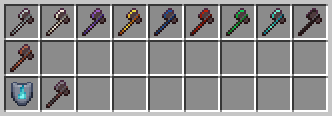
This mod introduces new trims for tools, allowing customization similar to armor. Now you can decorate your pickaxes, swords, and axes with unique…
⬇ Download on Modrinth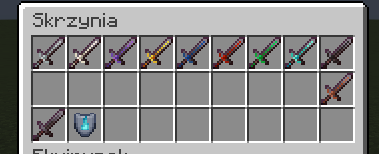

About mod:
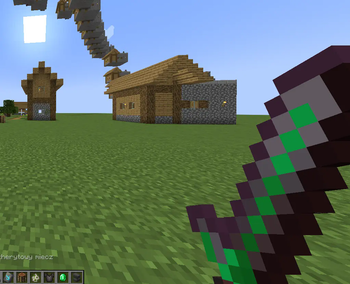
This mod introduces new trims for tools, allowing customization similar to armor. Now you can decorate your pickaxes, swords, and axes with unique patterns to match your playstyle. Explore the world of Minecraft, discover special smithing templates, and give your tools a distinctive look!
The mod is still in development and is currently in its alpha version! Not all tools have their trim variants yet, but we're working on future updates. Expect new features and improvements in upcoming releases!
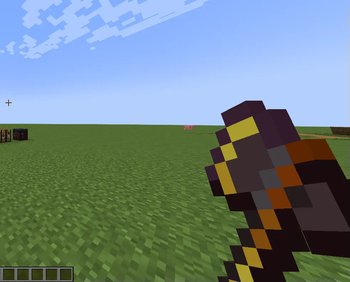
What's new?Added the ability to apply the "Heat" trim to netherite pickaxes
Netherite pickaxes can be decorated with all decorative materials (Copper ingot/ Iron ingot/ Amethyst/ Gold Ingot/ Quartz/ Emerald/ Redstone Dust/ Lapis Lazuli/ Diamond/ Netherite)
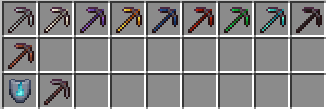
WARNING! This mod is still in development and currently only supports applying trims to netherite swords, netherite axes or netherite pickaxes. More tools will be added in future updates!
Content:
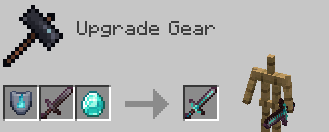
Applying smithing templates Templates can be applied to the tool (only the netherite sword, netherite axes or netherite pickaxes for now) in the smithing table by inserting: smithing template -> tool -> mineral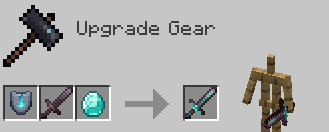
List of minerals that can be used:
Netherite Ingot
Diamond
Emerald
Redstone Dust
Lapis Lazuli
Gold Ingot
Amethyst Shard
Nether Quartz
Iron Ingot
Copper Ingot
Smithing Templates:
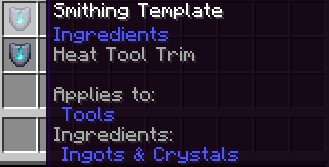
"Heat" smithing template This is a smithing template that can be found in the weaponsmith's house in all types of villages. There is a 1/3 chance of finding it in quantities of 1 to 2.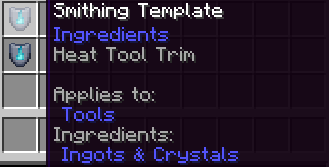
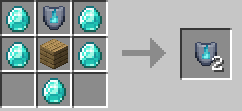
Template duplication recipe:
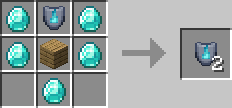
*Any type of planks can be used instead of oak planks
Information:
Tool Trims Concept
Mod Version: 25y03a
Mod for: Minecraft Java
Neoforge version: 21.1.65 (Download here: https://projects.neoforged.net/neoforged/neoforge )
Minecraft version: 1.21.1
Authors: MrKazanek/Bluezers
- Edition: Minecraft Java
- File type: .jar
- Minecraft version listed: 1.21.1
- How to install: Install the matching mod loader (Forge, Fabric or NeoForge) for your Minecraft version. → Download the .jar. → Put it in the .minecraft/mods folder and launch that loader profile.
- Where to get it: Opens on Modrinth — not every file is mirrored on our own servers.
Install steps are the general flow for this file type — How to install Minecraft Java mods & modpacks walks through it step by step.
- Ships as tool_trims-25y04a-neoforge-1.21.1.jar — drop this file into the mods folder
- Download size: 375 KB
- Download link checked 31 Aug 2026 — working
These come from our own check of the pack file, not from the source page.