
Casino Helper
Casino Helper is the ultimate utility mod for DonutSMP casino hosts, designed to streamline operations and enhance the gambling experience. Stop calculating payouts manually and start hosting like a pro.
🚀 Key Features
- ⚡ Automated Payouts: When a player wins, just enter the multiplier and the mod automatically copies the
/paycommand to your clipboard. - Real-time HUD: Track live bets, session profits, and player stats instantly on your screen.
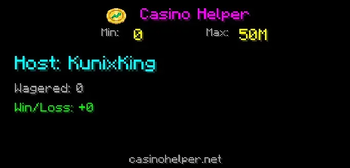
- Live Dashboard: Automatically syncs with casinohelper.online for advanced analytics, leaderboards, and public host profiles.
- Smart Tracking: Automatically monitors chat for "paid you" messages to detect bets.
- Anti-Scam Tools: Tracks total volume and profit to ensure fair play.
- Secure & Easy: No API keys required! The backend handles all DonutSMP API connections securely.
Requirements
- Minecraft Java Edition
- Fabric Loader
- Fabric API: Required - Download here
🎮 How to Use
Installation: Drop the
.jarfile into your.minecraft/modsfolder along with Fabric API.Registration:
- Join DonutSMP.
- The mod will automatically register you with the dashboard on your first login.
The Interface:
- Press
Kto open the Casino Manager GUI. - Press
Hto toggle the HUD overlay. - Press
Oto open Settings. - Note: You can change these keybinds in
Options > Controls > Key Bindsunder the "Casino Helper" category.
- Press
Setting Limits:
- Change Min/Max: In the GUI (
K), click on the Min or Max values at the top.- Left-Click: Increase limit.
- Right-Click: Decrease limit.
- Under Min: If a player pays less than the minimum, it is automatically treated as a donation and does not enter the queue.
- Over Max: If a player pays more than the maximum (e.g., bets $5M when Max is $2M), the mod automatically splits the bet into multiple chunks (e.g., $2M, $2M, $1M) so you can play them out one by one.
- Change Min/Max: In the GUI (
Hosting a Casino:
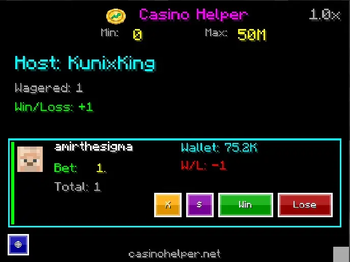
- When a player pays you, the mod automatically detects the bet and adds them to your queue.
- Open the GUI (
K) to see the active bet. - To Pay a Win: Click Win, enter the multiplier (e.g.,
2or3) and press Enter. The/paycommand is automatically copied to your clipboard!- Then just press
T(chat),Ctrl+V(paste), andEnter.
- Then just press
- To Take a Loss: Click Lose to resolve the bet and update stats.
- Refund/Cancel (X): Click the
Xbutton to void the bet (copies a refund command). This removes it from your stats without counting as a win or loss. - Donation ($): Click the
$button if the payment was a donation. This removes it from your "Wagered" volume stats entirely.
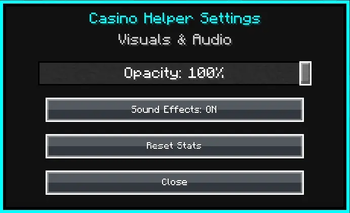
Settings:
- Toggle Sound Effects and Chat Feedback Messages (like "Command Copied") on or off in the settings menu.
Dashboard: Visit casinohelper.online to view your public profile, profit graphs, and rankings.
Elevate your casino hosting with professional tools and a dedicated web dashboard at casinohelper.online.
Not affiliated with DonutSMP.
- Edition: Minecraft Java
- File type: .jar
- Minecraft version listed: 1.21.4
- How to install: Install the matching mod loader (Forge, Fabric or NeoForge) for your Minecraft version. → Download the .jar. → Put it in the .minecraft/mods folder and launch that loader profile.
- Where to get it: Opens on Modrinth — not every file is mirrored on our own servers.
Install steps are the general flow for this file type — How to install Minecraft Java mods & modpacks walks through it step by step.
- Ships as casinohelper-1.0.0+1.21.4.jar — drop this file into the mods folder
- Download size: 819 KB
- Download link checked 31 Aug 2026 — working
These come from our own check of the pack file, not from the source page.