
Custom Item Durability Bar (CIDB)
I don't know my version or loader
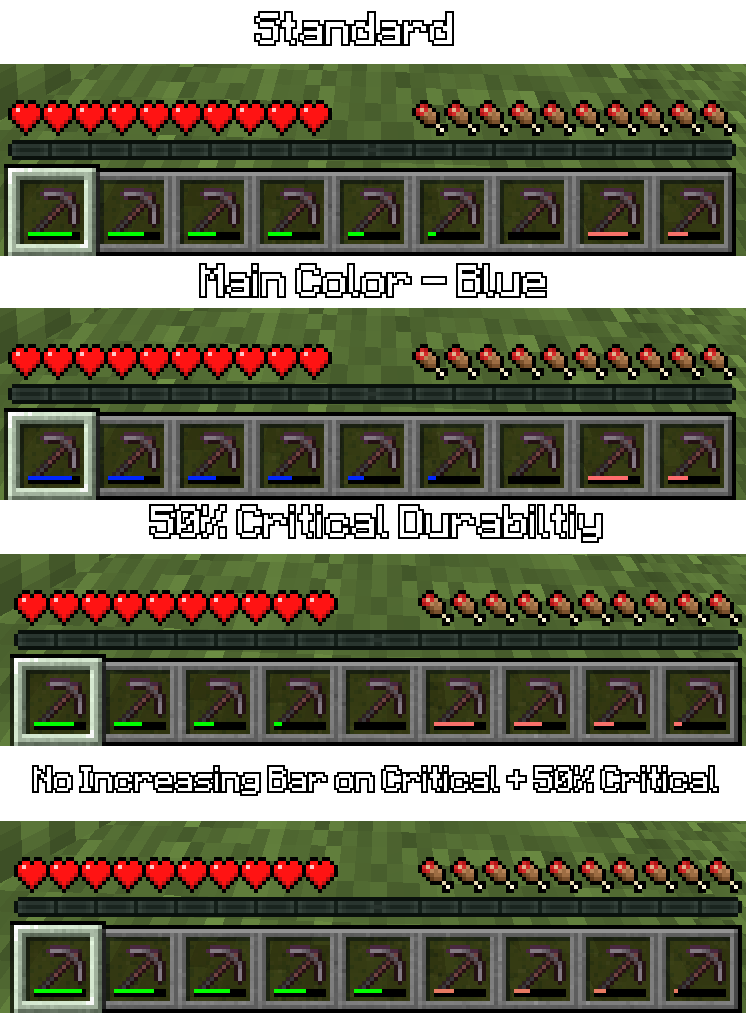
Did you want to change color of item durability? CIDB (abbreviated from Custom Item Durability Bar) allows you to do not only that, but also make it twinkle at selected durability with selectable color through config!
Guide This guide is here to help you with configure mod to how you like it.If you don't have imagination to create your own custom bar, use presets in bottom of config screen. Check bottom of this guide to know what presets are.
Colors
Durability Colors
A list of colors. They're used for color of durability bar (how unexpected!).
Warning! Color doesn't changes by HUE rotation. If you want from green to red, and expected yellow, it will be orange. Add yellow in middle of list if you want it.
Durability Flickering Color
When durability of item is critical (Check Parameters), durabiltiy bar will flick with selected color.
Durability Bar Color Style (since 0.2.1)
Vanilla - vanilla.
Rainbow - Color changes with time. Speed is taken from Durability Flickering Speed.
Gradient - bar is now gradient. Doesn't affect Text Styles.
Full/Empty Bundle Bar Color
As name says, those are used for bundle bar.
Unique Item Color List (since 0.2.0)
If item in that map, mod will use spesified color, that were connected with item. Same color issue as in Durability Colors.
Parameters
Flickering Durability
If enabled, durability bar will flicker if durability is critical.
Increasing Durability bar on Critical
If enabled: as close bar is to critical point, bar will increase to maximum.
Durability Bar Style
Horizontal - vanilla, Vertical - well, vertical.
Absolute - displays durability as text, with short scales.
Percent - displays durability as text by percent.
Critical Percent
A part of durability, which considered critical. 50% - half, 25% - 1/4 of full.
Presets (since 0.2.1)
Rainbow style
Bar will be change with colors of rainbow with time.
Item style
Bar of item will depend on color of material (wood - brown, iron - white).
Suggest your own presets/styles on github of project!
Requires YetAnotherConfigLib only for versions 0.1.0 and 0.0.1.
Why Archived?
While reviewing the code, I realized that implementing an update would be difficult. Aside from the bad architecture, there are also some bad design choices. For instance, text cannot be used alongside the bar. Perhaps someday I will revisit this idea and do a much better job of it.
- Edition: Minecraft Java
- File type: .jar
- Minecraft versions listed: 1.21.9, 1.21.10
- How to install: Install the matching mod loader (Forge, Fabric or NeoForge) for your Minecraft version. → Download the .jar. → Put it in the .minecraft/mods folder and launch that loader profile.
- Where to get it: Opens on Modrinth — not every file is mirrored on our own servers.
Install steps are the general flow for this file type — How to install Minecraft Java mods & modpacks walks through it step by step.
- Ships as cidb-1.21.9-0.2.1.jar — drop this file into the mods folder
- Download size: 106 KB
- Download link checked 31 Aug 2026 — working
These come from our own check of the pack file, not from the source page.