

💜 Name History
Warning: This mod has been generated mostly with AI as i couldnt be bothered, but I want to inform my users of this.
A beautiful, modern Minecraft mod for viewing player username history





✨ Features
🎨 Beautiful UI
- Modern purple color scheme that's easy on the eyes
- Fully customizable colors - change every aspect of the theme to match your style
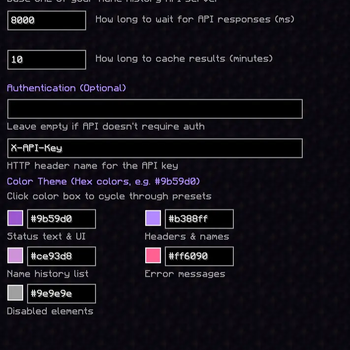
- Real-time color preview in the config screen with grid layout
🔍 Powerful Lookup
- Chat Commands - Quick lookups via
/namehistory <username|uuid> - Player Auto-Complete - Tab completion for online player names
- Cached Results - Fast repeated queries with configurable cache duration
- Smart Detection - Automatically detects whether you're searching by username or UUID
⚙️ Highly Configurable
- ModMenu Integration - Easy configuration through ModMenu
- API Endpoint - Connect to any compatible name history API
- Optional Authentication - API key support for private servers
- Customizable Timeouts - Adjust request timeout and cache duration
- Grid Layout - Organized 2-column color configuration
🚀 Getting Started
Installation
- Install Fabric Loader
- Download and install Fabric API
- Download and install Fabric Language Kotlin
- Download the latest release of Name History
- Place the
.jarfile in your.minecraft/modsfolder - Launch Minecraft!
Usage
Commands:
/namehistory <username|uuid>  # Look up a player's name history (with tab completion)
/namehistory update <query>   # Force update cached data
/namehistory delete <query>   # Remove cached entry
Examples:
/namehistory Notch
/namehistory 069a79f4-44e9-4726-a5be-fca90e38aaf5
/namehistory update jeb_
Tip: Press Tab after /namehistory to auto-complete from online player names!
⚙️ Configuration
The mod creates a config file at config/namehistory-client.json on first launch.
Default Configuration
{
  "baseUrl": "https://liforra.de/api/namehistory",
  "requestTimeoutMs": 8000,
  "cacheTtlMinutes": 10,
  "apiKey": "",
  "apiKeyHeader": "X-API-Key",
  "primaryColor": "#9b59d0",
  "secondaryColor": "#b388ff",
  "specialColor": "#ce93d8",
  "errorColor": "#ff6090",
  "disabledColor": "#9e9e9e"
}
Configuration Options
| Option | Description | Default |
|---|---|---|
baseUrl |
API endpoint URL | https://liforra.de/api/namehistory |
requestTimeoutMs |
Request timeout in milliseconds | 8000 |
cacheTtlMinutes |
Cache duration in minutes | 10 |
apiKey |
API key (leave empty if not needed) | "" |
apiKeyHeader |
HTTP header name for API key | X-API-Key |
primaryColor |
Main UI text color | #9b59d0 |
secondaryColor |
Headers & player names color | #b388ff |
specialColor |
Name history entries color | #ce93d8 |
errorColor |
Error messages color | #ff6090 |
disabledColor |
Disabled elements color | #9e9e9e |
Using ModMenu
If you have ModMenu installed:
- Click "Mods" from the main menu
- Find "Name History" in the list
- Click the config button
- Customize colors by clicking the color preview boxes!
🔧 Building from Source
Prerequisites
- Java 21 or higher
- Git
Build Steps
git clone https://github.com/liforra/namehistory-minecraft.git
cd namehistory-minecraft
./gradlew build
The compiled mod will be in build/libs/name-history-0.1.0.jar.
🌐 API Compatibility
This mod works with any API that implements the following endpoints:
| Method | Endpoint | Description |
|---|---|---|
GET |
/api/namehistory?username=<username> |
Get history by username |
GET |
/api/namehistory/uuid/<uuid> |
Get history by UUID |
POST |
/api/namehistory/update |
Force update player data |
DELETE |
/api/namehistory?username=<username> |
Delete cached entry |
📄 Full API Documentation
- OpenAPI Specification:
openapi.yaml - Detailed Documentation: API.md
Response Format
{
  "uuid": "069a79f4-44e9-4726-a5be-fca90e38aaf5",
  "query": "Notch",
  "history": [
    { "id": 1, "name": "Notch", "changedAt": null, "censored": false }
  ]
}
💡 Tip: Use the OpenAPI spec to generate client libraries or server stubs.
📸 Screenshots
Chat Command Output

Configuration Screen

🎨 Artwork and Attribution
- The purple icon used in this project is a modified derivative of
icon.pngfrom the project “fabric-name-history-lookup” by Woolyenough
(Copyright © 2022 Woolyenough), licensed under the MIT License. - Original repository: https://github.com/Woolyenough/fabric-name-history-lookup
- Changes: recoloring to purple, removal of the stem, centering of the glyph, and minor pixel adjustments for the theme.
This project includes the MIT license text and copyright notice for that
asset in ICON_NOTICE.txt.
No endorsement by the original author is implied.
📝 License
This project is licensed under the GNU Affero General Public License v3.0 (AGPL-3.0).
See LICENSE for details.
Third‑party components:
- Icon derivative: MIT-licensed work by Woolyenough (see
ICON_NOTICE.txt).
🤝 Contributing
Contributions are welcome! Feel free to:
- Report bugs
- Suggest new features
- Submit pull requests
- Improve documentation
💖 Credits
- Built with Fabric
- Written in Kotlin
- Inspired by the need for a beautiful, modern name history viewer
Made with 💜 by liforra
- Edition: Minecraft Java
- File type: .jar
- Minecraft version listed: 26.2
- How to install: Install the matching mod loader (Forge, Fabric or NeoForge) for your Minecraft version. → Download the .jar. → Put it in the .minecraft/mods folder and launch that loader profile.
- Where to get it: Opens on Modrinth — not every file is mirrored on our own servers.
Install steps are the general flow for this file type — How to install Minecraft Java mods & modpacks walks through it step by step.
- Ships as namehistory-0.2.0-26.2-fabric.jar — drop this file into the mods folder
- Download size: 3.4 MB
- Download link checked 22 Sept 2026 — working
These come from our own check of the pack file, not from the source page.