RpEssentials
RpEssentials is a comprehensive server-side utility mod built for immersive Roleplay servers running Minecraft 1.21.1 on NeoForge. It provides a complete suite of RP tools: proximity-based name obfuscation, a profession and license system, a warn system, connection tracking, private messaging, schedule automation, staff moderation tools, advanced chat formatting, world border warnings, named zones, Death RP, and deep LuckPerms integration. All configurable in real-time without restarts.
Current version: 4.2.0: See CHANGELOG for the full history.
Requirements
| Dependency |
Version |
Side |
Required |
| Minecraft |
1.21.1 |
Both |
✅ |
| NeoForge |
21.1.219+ |
Both |
✅ |
| LuckPerms |
Any |
Server |
⬜ Optional |
| Curios |
9.5.1-1.21.1 |
Both |
⬜ Optional |
| ImmersiveMessages |
neoforge-1.21.1:1.0.18 |
Client |
⬜ Optional |
| TxniLib |
neoforge-1.21.1:1.0.24 |
Client |
⬜ Optional |
ImmersiveMessages and TxniLib are only required on the client if you use zoneMessageMode = IMMERSIVE. The server runs fine without them.
Installation
- Download the latest
rpessentials-X.X.X.jar from the releases page.
- Place the JAR in your server's
mods/ folder.
- (Optional) Install LuckPerms for prefix/suffix and group-based staff permissions.
- Start the server: all config files are generated automatically under
config/rpessentials/.
- Edit the relevant config files (see 'Configuration' below).
- Reload in-game with
/rpessentials config reload or restart the server.
Features
Proximity Obfuscation
Prevents metagaming by hiding player identities based on distance:
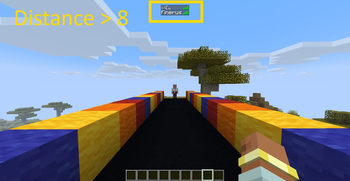
- Player names in the TabList and above heads are replaced with
????? beyond a configurable range (default: 8 blocks).
- Tab list player head hidden for obfuscated players: The skin icon next to an obfuscated player's name in the tab list is hidden, preventing skin-based identification. Non-obfuscated players, staff, whitelisted players, and always-visible players are unaffected.
- Sneak Stealth Mode: Crouching players are only detectable at 2 blocks (configurable).
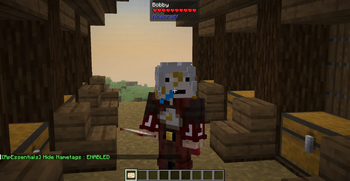
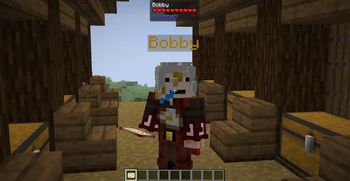
- Nametag Hiding: Optionally hide all player nametags above heads server-wide.
- Whitelist: Players who always see all names clearly.
- Blacklist: Players who are always hidden regardless of distance (stealth staff, NPCs).
- Always Visible List: Players who are never obfuscated to anyone.
- Spectator Blur: Players in spectator mode are automatically hidden from the TabList.
- LuckPerms rank prefixes are always hidden during obfuscation to prevent rank-based metagaming.
- Staff with
opsSeeAll see both nickname and real name simultaneously: Nickname (RealName).
Nickname System
Persistent RP nicknames fully integrated across all mod systems:
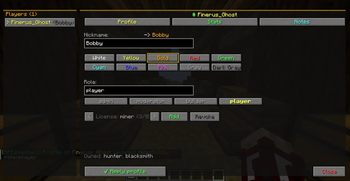
- Set custom nicknames with full
§ and & color code support.
- Nicknames appear in the TabList, above heads, in chat, and in private messages.
- Stored persistently in
world/data/rpessentials/nicknames.json.
/whois allows staff to reverse-lookup any nickname to its real MC username and UUID.
Nametag System
Realistic nametag behavior integrated with the nickname system:
- Block occlusion: Nametags are hidden when a block is between the viewer and the target. Implemented by switching
Font.DisplayMode from SEE_THROUGH to NORMAL, activating the GPU depth test, same technique as the Realistic Nametag mod. No raycast, no performance overhead.
- Server nickname on nametag: The nametag displays the nickname set on the server (via
/rpessentials nick), with the LuckPerms prefix and full color code support. Never uses a locally cached nickname.
- Global hide toggle: All nametags can be hidden server-wide via
hideNametags = true in rpessentials-core.toml or /rpessentials config set hideNametags true/false.
Profession & License System
A complete job restriction system for RP servers:
- Define unlimited professions with custom names and color codes.
- Physical license items are given to players, carrying profession metadata and issuance date.
- RP Licenses: Decorative-only licenses for events, with a printed expiration date and no actual permissions.
- Restriction types: crafting, block breaking, item usage, equipment (armor/weapons), and attacks.
- Global restrictions apply to all players by default, with per-profession overrides for licensed players.
- Wildcard pattern support:
minecraft:*_pickaxe blocks an entire item category.
- Restriction messages shown via action bar with anti-spam cooldown.
- Tooltips display required professions on restricted items (client-side packet sync).
- License Audit Log: Every
GIVE, REVOKE, and GIVE_RP action is permanently logged to world/data/rpessentials/license-audit.json.
- Temp License Registry: RP licenses are tracked in
world/data/rpessentials/licenses-temp.json.
- Revoked license items are automatically removed from the player's inventory.
- Whitelisted players are exempt from all profession restrictions (configurable).
- Granting or revoking a license automatically adds or removes the corresponding vanilla scoreboard tag (tag name = profession ID).
Warn System
Full staff warning system for moderation:
- Issue permanent or temporary warns to any online player.
- The warned player receives an immediate in-chat notification with the reason and duration.
- On every login, players are notified of their active warn count and invited to run
/mywarn.
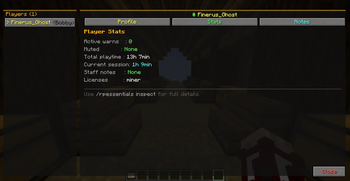
/mywarn lets any player view their own active warns with reason, issuer, date, and remaining time.- Configurable staff broadcast on every warn add and warn remove.
- Automatic purge of expired temp-warns on player login (configurable).
- Warn IDs are auto-incremental integers, recalculated after every deletion to avoid gaps.
- Data stored in
world/data/rpessentials/warns.json.
Last Connection Tracking
Automatic recording of player connection history:
- Records last login and last logout for every player.
- Data stored in
world/data/rpessentials/lastconnection.json: human-readable UUID (McUsername) key format.
- Staff can look up any player's last connection time, even for offline players.
- List view shows the N most recent connections sorted by date.
Private Messaging
Custom /msg system fully replacing vanilla messaging:
/msg <player> <message>, /tell, /w, /whisper: send private messages with Rp Essentials formatting./r <message>: reply to the last person who messaged you.- Messages formatted with nicknames, LuckPerms prefixes/suffixes, and color codes.
- Clickable "Click to reply" button in received messages.
- Console-to-player messaging supported.
Advanced Chat
Full chat formatting system:
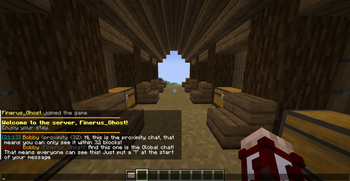
- Customizable player name format with LuckPerms prefix/suffix support (
$prefix $name $suffix).
- Full message template with timestamp and color support (
$time | $name: $msg).
- Global chat message color configuration (16 Minecraft colors available).
- Timestamp system with customizable Java
SimpleDateFormat.
- Real-time Markdown support:
**text** → Bold*text* → Italic__text__ → Underline~~text~~ → Strikethrough
/colors displays all available colors and formatting codes with a visual preview.- Full integration with the nickname system, nicknames appear in chat automatically.
Join / Leave Messages
- Fully customizable join and leave messages with
{player} and {nickname} placeholders.
- Full color code support.
- Can be disabled entirely.
Welcome Message
- Configurable multi-line welcome message sent to players on login.
- Optional sound effect with configurable volume and pitch.
{player} and {nickname} variable support.- Integrates with the schedule system to display server status.
Server Schedule
Automated server opening and closing management with per-day support:
- Each day of the week (
MONDAY through SUNDAY) has its own enabled, open, and close fields.
- Disabled days are treated as fully closed.
- Automated warnings at 45, 30, 10, and 1 minute before closing.
- Smart kick system that only affects non-staff players.
- Staff receives notifications when the server opens or closes.
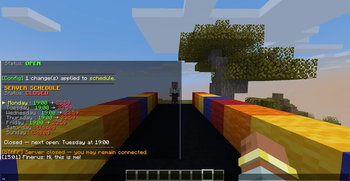
- The kick message displays the next open day and its hours (placeholders:
{day}, {open}, {close}).
/rpessentials schedule and /schedule display the full week at a glance with the current day highlighted.- Aliases:
/schedule and /horaires.
Death Hours
An optional schedule layer that activates Death RP during configured time slots, independently of the global Death RP toggle. Supports cross-midnight ranges. Disabled by default.
HRP Hours
An optional schedule layer for out-of-roleplay (HRP) period management:
- Two tiers: tolerated (noted but not punished) and allowed (fully free).
- Broadcast message sent once per slot start to all connected players.
- Configurable display mode:
CHAT, ACTION_BAR, TITLE, IMMERSIVE.
- Disabled by default, entirely ignored when
enableHrpHours = false.
Death RP
Permanent death system for RP servers:
- Global toggle enabling or disabling the system in real-time.
- Per-player overrides to enable, disable, or reset to the global state.
- On RP death: a broadcast is sent to all connected players with the deceased's nickname and real name.
- A configurable sound is played to all players on RP death.
- Optional automatic whitelist removal on RP death (
whitelistRemove).
- All messages and sounds are fully configurable for both global and per-player toggles.
World Border & Named Zones
- Distance-based warning triggered by proximity to spawn (independent of the vanilla world border).
- Configurable message with
{distance} and {player} placeholders.
- Named Zones: Define circular zones with center coordinates, radius, and custom entry/exit messages.
- Configurable display mode for zone messages:
IMMERSIVE, CHAT, ACTION_BAR.
Staff Moderation Tools
Silent staff commands with full logging:
- Silent gamemode, teleport, and effect commands: invisible to other players.
- All actions logged to console and broadcast to other online staff (configurable).
- Target notification disabled by default (stealth mode).
Teleportation Platforms
- Define named platforms across dimensions with custom coordinates.
- Staff can teleport themselves or other players to any platform.
/setplatform command to create or update a platform without editing the config file.
Roles
- Assign predefined roles to players via
/rpessentials setrole.
- Automatically removes all existing role tags, adds the new tag, and sets the corresponding LuckPerms group.
- Roles configurable in
rpessentials-core.toml under [Roles]. Format: roleId;lpGroup.
- Full tab-completion of available roles.
- Requires OP level 3.
Auto-Unwhitelist
Automatic removal of inactive players from the whitelist:
- Configurable inactivity threshold (days).
- Runs once per day at midnight.
- Requires
enableLastConnection = true.
- Staff members online at the time receive a clickable cancel button to immediately re-whitelist the player.
- Optional extra commands executed per removed player. Placeholders:
{player}, {uuid}.
- Disabled by default.
Staff Permission System
Multi-layered staff detection for maximum reliability:
- Scoreboard tags (
admin, modo, staff, builder: configurable).
- Minimum OP level bypass (configurable from 0 to 4).
- LuckPerms group integration (configurable).
- Results cached for better performance (30-second cache).
- Automatic cache invalidation on logout.
Fully Configurable Messages
Every player-facing string in the mod is exposed as a configurable value via oneria-messages.toml:
- Full English translation of all messages out of the box.
§ and & color code support in all values.- Reloadable at runtime with
/rpessentials config reload (no restart required).
- Organized into clear sections:
[System], [Private Messaging], [Warn System], [Last Connection], [Death RP], [Whois], [Player List], [Help], [Profession Restrictions].
Commands
Permissions: OP 2 = OP level ≥ 2; Staff = staff role detected by the mod's permission system; Everyone = all players.
Configuration
| Command |
Permission |
Description |
/rpessentials config reload |
OP 2 |
Reload all configs and clear caches. |
/rpessentials config status |
OP 2 |
Display current status of all mod systems. |
/rpessentials config set <option> <value> |
OP 2 |
Modify any config option in real-time. |
Nicknames
| Command |
Permission |
Description |
/rpessentials nick <player> <nickname> |
OP 2 |
Set a nickname (supports color codes). |
/rpessentials nick <player> |
OP 2 |
Reset a player's nickname. |
/rpessentials nick list |
OP 2 |
List all active nicknames. |
/whois <nickname> |
OP 2 |
Find the MC username and UUID behind a nickname. |
Licenses
| Command |
Permission |
Description |
/rpessentials license give <player> <profession> |
OP 2 |
Grant a functional license. |
/rpessentials license giverp <player> <profession> <days> |
OP 2 |
Grant a decorative RP-only license with an expiration date. |
/rpessentials license revoke <player> <profession> |
OP 2 |
Revoke a license. |
/rpessentials license list [player] |
OP 2 |
List all licenses, or those of a specific player. |
/rpessentials license check <player> <profession> |
OP 2 |
Check if a player holds a specific license. |
Warns
| Command |
Permission |
Description |
/rpessentials warn add <player> <reason> |
Staff |
Issue a permanent warn. |
/rpessentials warn temp <player> <minutes> <reason> |
Staff |
Issue a temporary warn. |
/rpessentials warn remove <player> <warnId> |
Staff |
Remove a specific warn. |
/rpessentials warn list [player] |
Staff |
List all warns, or all warns for a player. |
/rpessentials warn info <player> <warnId> |
Staff |
Show full details of a warn. |
/rpessentials warn clear <player> |
Staff |
Remove all warns for a player. |
/rpessentials warn purge |
Staff |
Purge all expired temp-warns. |
/mywarn |
Everyone |
View your own active warns. |
Last Connection
| Command |
Permission |
Description |
/rpessentials lastconnection <player> |
Staff |
Show last login/logout for a player. |
/rpessentials lastconnection list [count] |
Staff |
List the N most recent connections (default: 20). |
Death RP
| Command |
Permission |
Description |
/rpessentials deathrp enable <true|false> |
Staff |
Toggle Death RP globally. |
/rpessentials deathrp player <player> enable <true|false> |
Staff |
Set a per-player override. |
/rpessentials deathrp player <player> reset |
Staff |
Remove a player's individual override. |
/rpessentials deathrp status |
Staff |
Display system state and all active overrides. |
Roles
| Command |
Permission |
Description |
/rpessentials setrole <player> <role> |
OP 3 |
Assign a role to a player (sets tags + LuckPerms group). |
Staff
| Command |
Permission |
Description |
/rpessentials staff gamemode <mode> [player] |
Staff |
Silent gamemode change. |
/rpessentials staff tp <player> |
Staff |
Silent teleport. |
/rpessentials staff effect <player> <effect> <duration> <amplifier> |
Staff |
Silent effect application. |
/rpessentials staff platform [player] [id] |
Staff |
Teleport to a named platform. |
/setplatform <id> <dimension> <x> <y> <z> |
OP 2 |
Create or update a platform entry. |
Whitelist / Blacklist
| Command |
Permission |
Description |
/rpessentials whitelist add/remove/list |
OP 2 |
Manage the blur bypass whitelist. |
/rpessentials blacklist add/remove/list |
OP 2 |
Manage the always-hidden blacklist. |
/rpessentials alwaysvisible add/remove/list |
OP 2 |
Manage the never-obfuscated list. |
Messaging
| Command |
Permission |
Description |
/msg <player> <message> |
Everyone |
Send a private message. |
/tell, /w, /whisper |
Everyone |
Aliases for /msg. |
/r <message> |
Everyone |
Reply to the last person who messaged you. |
Public
| Command |
Permission |
Description |
/rpessentials schedule / /schedule / /horaires |
Everyone |
View server schedule and status. |
/rpessentials help |
Everyone |
Display available commands (staff section shown to staff only). |
/colors |
Everyone |
Display all color codes and formatting options. |
/list |
Everyone |
Custom player list showing nicknames and real usernames. |
/mywarn |
Everyone |
View your own active warns. |
Configuration
The mod uses 6 config files under config/rpessentials/, generated automatically on first launch. All files are fully documented with inline comments.
| File |
Contents |
rpessentials-core.toml |
Obfuscation, permissions, world border & zones, Death RP, roles |
rpessentials-chat.toml |
Chat formatting, markdown, timestamps, join/leave messages |
rpessentials-schedule.toml |
Per-day schedule, death hours, HRP hours, welcome message, auto-unwhitelist |
rpessentials-moderation.toml |
Silent commands, platforms, last connection, warn system |
rpessentials-professions.toml |
Profession definitions and all restriction lists |
rpessentials-messages.toml |
All customizable player-facing message strings |
rpessentials-core.toml
[Obfuscation Settings]
| Option |
Default |
Description |
enableBlur |
true |
Master switch for the obfuscation system. |
proximityDistance |
8 |
Detection range in blocks (normal). |
obfuscatedNameLength |
5 |
Number of ? characters in the obfuscated name. |
obfuscatePrefix |
true |
Hide LuckPerms rank prefix when obfuscating. |
opsSeeAll |
true |
Staff always see real names. |
hideNametags |
false |
Hide all player nametags above heads. |
showNametagPrefixSuffix |
true |
Show LuckPerms prefix/suffix in nametags. |
enableSneakStealth |
true |
Crouching reduces detection range. |
sneakProximityDistance |
2 |
Detection range for crouching players (blocks). |
blurSpectators |
true |
Hide spectator-mode players from the TabList. |
whitelist |
[] |
Players who always see all names clearly. |
blacklist |
[] |
Players who are always hidden. |
alwaysVisibleList |
[] |
Players who are never obfuscated to anyone. |
whitelistExemptProfessions |
false |
Whitelist players bypass profession restrictions. |
[Permissions System]
| Option |
Default |
Description |
staffTags |
["admin","moderateur","modo","staff","builder"] |
Scoreboard tags/groups considered staff. |
opLevelBypass |
2 |
Minimum OP level to bypass restrictions (0 = disabled). |
useLuckPermsGroups |
true |
Use LuckPerms groups for staff detection. |
luckPermsStaffGroups |
["admin","moderateur","staff"] |
LuckPerms groups treated as staff. |
[World Border Warning]
| Option |
Default |
Description |
enableWorldBorderWarning |
true |
Enable distance-based warnings. |
worldBorderDistance |
2000 |
Warning trigger distance from spawn (blocks). |
worldBorderMessage |
"..." |
Warning message. Variables: {distance}, {player}. |
worldBorderCheckInterval |
40 |
Check frequency in ticks (40 = 2 seconds). |
namedZones |
[] |
Named zones with entry/exit messages. Format: name;centerX;centerZ;radius;enterMsg;exitMsg. |
zoneMessageMode |
"ACTION_BAR" |
Display mode for zone messages: IMMERSIVE, CHAT, ACTION_BAR. |
[DeathRP]
| Option |
Default |
Description |
globalEnabled |
false |
Global state of the Death RP system. |
whitelistRemove |
false |
Automatically remove the player from the whitelist on RP death. |
deathMessage |
"..." |
Message broadcast to all players on RP death. Variables: {player}, {realname}. |
deathSound |
"minecraft:entity.wither.death" |
Sound played on RP death. Use none to disable. |
deathSoundVolume |
1.0 |
RP death sound volume. |
deathSoundPitch |
1.0 |
RP death sound pitch. |
[Roles]
| Option |
Default |
Description |
roles |
["admin;admin","modo;modo","builder;builder","joueur;joueur"] |
Role definitions. Format: roleId;lpGroup. |
rpessentials-chat.toml
[Chat Settings]
| Option |
Default |
Description |
enableChatFormat |
true |
Enable the chat formatting system. |
playerNameFormat |
"$prefix$name$suffix" |
Player name format in chat. |
chatMessageFormat |
"$time | $name: $msg" |
Full message template. |
chatMessageColor |
"white" |
Global chat message color. |
enableTimestamp |
false |
Show timestamps in chat. |
timestampFormat |
"HH:mm" |
Java SimpleDateFormat pattern for timestamps. |
enableMarkdown |
true |
Enable Markdown support in chat. |
[Join / Leave Messages]
| Option |
Default |
Description |
enableJoinMessage |
true |
Enable the join message. |
joinMessage |
"..." |
Join message. Variables: {player}, {nickname}. |
enableLeaveMessage |
true |
Enable the leave message. |
leaveMessage |
"..." |
Leave message. Variables: {player}, {nickname}. |
rpessentials-schedule.toml
[Schedule System | Per Day]
Each day of the week (MONDAY through SUNDAY) has its own fields:
| Option |
Default |
Description |
<day>.enabled |
varies |
Whether the server is open this day. |
<day>.open |
"18:00" |
Opening time (format HH:MM). |
<day>.close |
"23:00" |
Closing time (format HH:MM). |
[Messages]
| Option |
Description |
closingWarningMessage |
Warning message before closing. Variable: {time}. |
kickMessage |
Kick message. Variables: {day}, {open}, {close}. |
serverOpenMessage |
Broadcast message on server open. |
serverCloseMessage |
Broadcast message on server close. |
[Welcome Message]
| Option |
Default |
Description |
enableWelcomeMessage |
true |
Enable the welcome message. |
welcomeMessage |
["..."] |
Multi-line welcome message with color code support. |
welcomeSound |
"" |
Sound played on login (resource location string). |
welcomeSoundVolume |
1.0 |
Welcome sound volume. |
welcomeSoundPitch |
1.0 |
Welcome sound pitch. |
[Death Hours]
| Option |
Default |
Description |
enableDeathHours |
false |
Enable automatic Death RP activation by time slot. |
deathHoursSlots |
[] |
Time slots for Death RP activation. Format: HH:MM-HH:MM. |
[HRP Hours]
| Option |
Default |
Description |
enableHrpHours |
false |
Enable the HRP hours system. |
hrpBroadcastMode |
"CHAT" |
Display mode: CHAT, ACTION_BAR, TITLE, IMMERSIVE. |
[Auto-Unwhitelist]
| Option |
Default |
Description |
autoUnwhitelistEnabled |
false |
Enable automatic removal of inactive players from the whitelist. |
autoUnwhitelistDays |
30 |
Days of inactivity before removal. |
autoUnwhitelistExtraCommands |
[] |
Extra commands run on removal. Variables: {player}, {uuid}. |
rpessentials-moderation.toml
[Silent Commands]
| Option |
Default |
Description |
enableSilentCommands |
true |
Enable silent staff commands. |
logToStaff |
true |
Broadcast silent command usage to other staff. |
logToConsole |
true |
Log silent commands to the server console. |
notifyTarget |
false |
Notify the target of the action (disables stealth). |
[Teleportation Platforms]
| Option |
Default |
Description |
enablePlatforms |
true |
Enable the platform teleport system. |
platforms |
[...] |
Platform list (id;DisplayName;dimension;x;y;z). |
[Last Connection]
| Option |
Default |
Description |
enableLastConnection |
true |
Enable login/logout time tracking. |
trackLogout |
true |
Also record disconnection times. |
dateFormat |
"dd/MM/yyyy HH:mm:ss" |
Java SimpleDateFormat for stored dates. |
[Warn System]
| Option |
Default |
Description |
enableWarnSystem |
true |
Enable the warn system. |
notifyOnJoin |
true |
Notify players of active warns on login. |
joinMessage |
"..." |
Login notification message. Variable: {count}. |
maxTempDays |
30 |
Max duration for temp warns in days (0 = unlimited). |
autoPurgeExpired |
true |
Auto-purge expired warns on player login. |
addedBroadcastFormat |
"..." |
Staff broadcast on warn add. Variables: {id}, {staff}, {player}, {reason}, {expiry}. |
removedBroadcastFormat |
"..." |
Staff broadcast on warn remove. Variables: {id}, {staff}. |
rpessentials-professions.toml
| Option |
Description |
professions |
Profession definitions (id;DisplayName;§ColorCode). |
globalBlockedCrafts |
Items blocked from crafting for all players. |
globalUnbreakableBlocks |
Blocks that cannot be broken by anyone. |
globalBlockedItems |
Items that cannot be used or interacted with. |
globalBlockedEquipment |
Armor/weapons that cannot be equipped. |
professionAllowedCrafts |
Per-profession craft overrides (profession;item1,item2). |
professionAllowedBlocks |
Per-profession block breaking overrides. |
professionAllowedItems |
Per-profession item usage overrides. |
professionAllowedEquipment |
Per-profession equipment overrides. |
craftBlockedMessage |
Message shown when a craft is blocked. |
blockBreakBlockedMessage |
Message shown when block breaking is blocked. |
itemUseBlockedMessage |
Message shown when item use is blocked. |
equipmentBlockedMessage |
Message shown when equipping is blocked. |
rpessentials-messages.toml
All player-facing strings are configurable in this file. It is generated automatically on first start and organized into sections:
| Section |
Contents |
[System] |
System messages, config error strings |
[Private Messaging] |
Private message prompts and notifications |
[Warn System] |
All warn notifications, labels, and duration formats |
[Last Connection] |
Last connection display strings |
[Death RP] |
Death RP toggle and status messages |
[Whois] |
/whois result messages |
[Player List] |
Player list header |
[Help] |
All help menu entries |
[Profession Restrictions] |
Restriction feedback messages |
Data Storage
All persistent data is stored in the world folder. Files are human-readable JSON and can be edited manually. Keys use the UUID (McUsername) format for readability.
| File |
Contents |
world/data/rpessentials/nicknames.json |
Player nicknames |
world/data/rpessentials/licenses.json |
Player licenses |
world/data/rpessentials/license-audit.json |
License audit log |
world/data/rpessentials/licenses-temp.json |
Temporary (RP) license registry |
world/data/rpessentials/warns.json |
Player warns |
world/data/rpessentials/lastconnection.json |
Player connection history |
All saves are asynchronous. All loads are synchronous at server startup.
LuckPerms Integration
LuckPerms is optional. The mod works fully without it, with graceful fallback:
- Without LuckPerms: staff detection falls back to scoreboard tags and OP levels. Prefix/suffix display is disabled.
- With LuckPerms: full integration with prefixes, suffixes, groups, and permission nodes.
- All LuckPerms-dependent features are silently skipped when the mod is absent.
Performance
- Permission checks: 30-second cache (~90% overhead reduction).
- Profession restriction checks: ~0.1ms per check (cached) (most of the verification is now event-based so almost no impact).
- License database queries: ~0.5ms (with caching).
- Network sync: ~1KB packet per player on login.
- Cache cleanup runs every 20 seconds to prevent memory leaks.
- Nametag block occlusion: zero raycast overhead, handled entirely by GPU depth test.
- Estimated total overhead: <1% CPU usage on active servers.
Technical Information
| Field |
Value |
| Mod ID |
rpessentials |
| Group ID |
net.rp.rpessentials |
| Version |
4.2.0 |
| MC Version |
1.21.1 |
| NeoForge |
21.1.219+ |
| Java |
21 |