
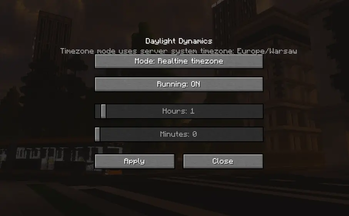
This mod lets you manipulate day length.
Mod setup:
Before 26.4.1:
- /daylength mode custom/timezone (to set in which mode it works).
- /daylength start/stop (to run the mod).
After 26.4.1:
- IN 26.4.1 to setup mod you need to use /daylightdynamics command and adjust settings in new GUI

Is there anything you would like to see added to this mod? Or maybe you have found a bug? Join our discord and get into our community! discord
For more specific info or to check on upcoming updates check out our website at: https://cookiecraftmods.com
Features
- Fully customizable day length
- Timezone synchronization
- Real-world clock syncing
- Server-side control over time progression
- Compatible sleeping mechanics even when using custom day lengths
Time Modes
Timezone Mode
Synchronizes Minecraft time with your server's local time, creating a seamless connection between the game world and real life.
Custom Mode
Set your own day length anywhere from 1 minute up to 24 hours and 59 minutes, allowing you to create anything from fast-paced gameplay to highly immersive long-day experiences.
Commands
Versions before 26.4.1
/daylength- Available modes:
custom,timezone
- Available modes:
Versions 26.4.1 and newer
/daylightdynamics- Opens the in-game configuration GUI
Perfect For
- Role-play servers that require longer, more realistic days
- SMP servers focused on immersion
- Realism and simulation-based modpacks
- Content creators and cinematic builders
- Survival players who want more daylight for exploration and building
Why use Daylight Dynamics?
Vanilla Minecraft uses a fixed day-night cycle that may not fit every playstyle.
Daylight Dynamics gives server owners and players the flexibility to match real-world time, extend daylight hours, or create entirely custom schedules without disrupting core gameplay mechanics such as sleeping.
- Edition: Minecraft Java
- File type: .jar
- Minecraft version listed: 1.21.11
- How to install: Install the matching mod loader (Forge, Fabric or NeoForge) for your Minecraft version. → Download the .jar. → Put it in the .minecraft/mods folder and launch that loader profile.
- Where to get it: Opens on Modrinth — not every file is mirrored on our own servers.
Install steps are the general flow for this file type — How to install Minecraft Java mods & modpacks walks through it step by step.
- Ships as dd-26.7.0-neoforge-1.21.11.jar — drop this file into the mods folder
- Download size: 56 KB
- Download link checked 31 Aug 2026 — working
These come from our own check of the pack file, not from the source page.