
Powered Signs
Java mod listed for Minecraft 1.20. Downloads from the MC Java Mods app on Android.
⬇ Download on Modrinth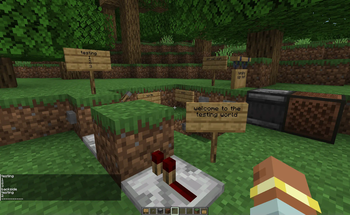
Powered Signs
This is a simple mod that adds one thing; when signs are powered, they broadcast their contents to nearby players.
When the block below a sign is powered, it will print its contents to any player's chat who is within 32 blocks of the sign.
The sign is then unable to print for the next second, or 20 ticks. If the redstone power is constant, it will continually print to nearby players.
The signs check for Weak and Strong redstone power, so be careful where you put them!
Quick Tutorial:
- Place a sign, and write on the front side, then back
- If you power the block below the sign, the contents of the sign will be printed
- Even if the sign is on a wall, the block below it is still the block you need to power. This will be tweaked later.
- The order of what is printed is front side top to bottom, back side top to bottom
- There are a few config options located at
./config/poweredsign.tomlas well;playerDistance: Is how many blocks away, in a square shape, the sign can print to player's chat (Default: 32),coolDownTicks: Is the amount of ticks that a sign as to wait before printing again (Default: 20, or 1 second),logSignPositions: An option for server moderators and as a light debugging tool; prints the location of signs in the world when they are powered (Default: false),particles: Redstone particles are spawned when the sign is powered (Default: true),audio: Powered signs make the lever clicking sound when powered (Default: true),
- Edition: Minecraft Java
- File type: .jar
- Minecraft versions listed: 1.20.2, 1.20.3, 1.20.4
- How to install: Install the matching mod loader (Forge, Fabric or NeoForge) for your Minecraft version. → Download the .jar. → Put it in the .minecraft/mods folder and launch that loader profile.
- Where to get it: Opens on Modrinth — not every file is mirrored on our own servers.
Install steps are the general flow for this file type — How to install Minecraft Java mods & modpacks walks through it step by step.
- Ships as poweredsigns-1.0.3.1.jar — drop this file into the mods folder
- Download size: 1.2 MB
- Download link checked 12 Oct 2026 — working
These come from our own check of the pack file, not from the source page.