
NearVanilla Shop Directory
I don't know my version or loader
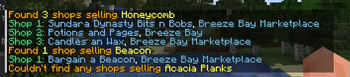
Overview:
This mod integrates the NearVanilla Shop Directory from Notion directly into Minecraft. Say goodbye to alt-tabbing—now, with a simple command, you can access the shop directory without leaving the game, making item searches quick and easy.
Key Features:
In-Game Shop Directory Integration
Access the shop directory straight from Minecraft using the/shop <item>command. No need to open Notion!Streamlined Gameplay
Keep the focus on your game with no need to switch between applications. Item searches are now just a command away.
Limitations:
Some item types are not searchable via the command, including:
- Enchanted Books
- Potions
- Entities
- Miniblocks (VanillaTweaks)
How to Use:
To search for an item, simply enter:/shop <item>
Replace <item> with the name of the item you’re looking for, and the mod will fetch results from the shop directory.
Why This Mod?
If you’re a player on the NearVanilla Server, this mod is a must-have! It integrates seamlessly with the game, giving you quick access to the shop directory so you can focus on the fun parts—exploring, building, and playing!
- Edition: Minecraft Java
- File type: .jar
- Minecraft versions listed: 26.1, 26.1.1, 26.1.2
- How to install: Install the matching mod loader (Forge, Fabric or NeoForge) for your Minecraft version. → Download the .jar. → Put it in the .minecraft/mods folder and launch that loader profile.
- Where to get it: Opens on Modrinth — not every file is mirrored on our own servers.
Install steps are the general flow for this file type — How to install Minecraft Java mods & modpacks walks through it step by step.
- Ships as nearvanillashopdirectorymod-0.1.2+26.1.jar — drop this file into the mods folder
- Download size: 1.2 MB
- Download link checked 22 Sept 2026 — working
These come from our own check of the pack file, not from the source page.