
InstantMarker




Description
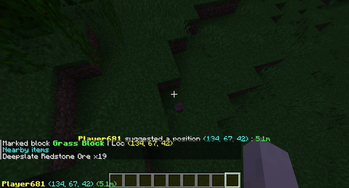
A Minecraft Fabric Mod that can mark the position you are pointing to and broadcast to all other players.
Usage
Install the mod, join a server or your single player world and press Z (you can change to other keys in Key Binding settings).
Configuration
You can modify global configurations in mod menu.
Also, we provided a command system that you can change configurations temporarily in game.
Commands
All in one root command: /im
Clear markers
To clear all markers you have created or received, type in the following command.
/im clear
Mute/Unmute
To mute a player's marking operation, you need to type this command, and he/she will be added into ignore list. It's only ignored by your client, but others can still see his/her markers.
/im mute <playerName>
To unmute a player, type this command, and he/she would be removed from ignore list.
/im unmute <playerName>
Sound settings
To enable/disable sound notification when someone (include yourself) marks a position, type the following command
/im sound
Local mode
To share or disable sharing your markers to others, use the following command
/im local
Share detailed information
To share more information around the marker, there are many things you can do
/im share <items|biome>
items: Share items around the marker (10×10×6 blocks) to others.biome: Share the biome the marker at to others.
Dependencies
oωo
Version requirement: >=0.8.2
Provides configuration management
(Optional) Mod Menu
Version requirement: >=4.0.5
Provides a global configurations panel
License
This project is licensed under MIT License. You can view it in LICENSE in root directory.
- Edition: Minecraft Java
- File type: .jar
- Minecraft version listed: 1.21.4
- How to install: Install the matching mod loader (Forge, Fabric or NeoForge) for your Minecraft version. → Download the .jar. → Put it in the .minecraft/mods folder and launch that loader profile.
- Where to get it: Opens on Modrinth — not every file is mirrored on our own servers.
Install steps are the general flow for this file type — How to install Minecraft Java mods & modpacks walks through it step by step.
- Ships as instantmarker-1.1.jar — drop this file into the mods folder
- Download size: 55 KB
- Download link checked 22 Sept 2026 — working
These come from our own check of the pack file, not from the source page.