
Enhanced Effects
This mod aims to enhance the uses of potions by adding useful recipes such as poisoned food It also add a non-lingering potion tipped arrow recipe
⬇ Download on Modrinth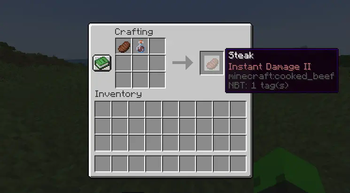
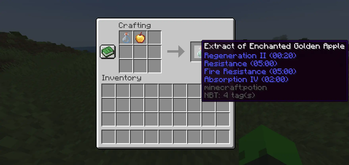
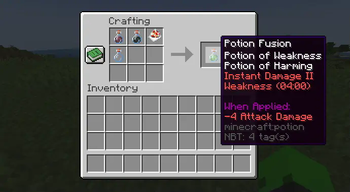

Enhanced Effects adds usefuls crafting recipes using potions
Effect Catalyst
A new item used in most of the mod recipes
Poisoned Food
The player can now poison any food with a potion. When this food is eaten, the potion effect is applied (if the food already has effects you will have to add an Effect Catalyst to the crafting grid)
Potion Merging
You can now take any potions you want as well as an Effect Catalyst and a glass bottle to create a new potion from the ones in the crafting grid
Effect Extraction
You can now extract effects from foods by putting them with a glass bottle in the crafting grid. This will give you a custom potion containing the effects of the food. You can get the splash and the lingering variants by adding a gunpowder or dragon breath to the crafting grid
Tipped Arrows
You can now craft tipped arrows from splash potions and regular potions
- Edition: Minecraft Java
- File type: .jar
- Minecraft version listed: 1.21.1
- How to install: Install the matching mod loader (Forge, Fabric or NeoForge) for your Minecraft version. → Download the .jar. → Put it in the .minecraft/mods folder and launch that loader profile.
- Where to get it: Opens on Modrinth — not every file is mirrored on our own servers.
Install steps are the general flow for this file type — How to install Minecraft Java mods & modpacks walks through it step by step.
- Ships as enhanced_effects-1.1.3-1.21.1.jar — drop this file into the mods folder
- Download size: 59 KB
- Download link checked 1 Sept 2026 — working
These come from our own check of the pack file, not from the source page.