
messed up settings
Java mod listed for Minecraft 1.21. Downloads from the MC Java Mods app on Android.
⬇ Download on Modrinth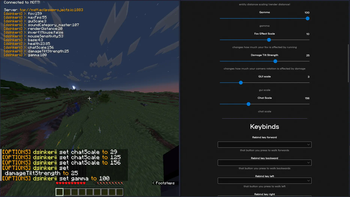
source code and (app) downloads are hosted on github!
‼️ READ BEFORE INSTALLING ‼️
🔴 IF you are the one who is going to edit the settings, make sure to follow these steps:
- install dotnet (if u haven't already)
- download an executable file according to your os (direct downloads from github btw!)
- paste in your password and change your nickname if you want to, and enjoy!
🔴 IF you are the one running the mod, allowing to change your settings, follow these steps:
- make sure you have 1.21 fabric installed.
- install pehkui (additionally slyde and libjf to remove limits from options)
- after launching the mod, you can now copy the password (in the main menu) needed for your friends that will be editing your settings!
every time you reboot your game, your password changes, so in case it gets leaked or lost, you can just close the game to reset your password.
if you have any issues with this mod or following any of the steps, feel free to open an issue. (in case its an emergency (something like a security exploit) feel free to DM me in discord: @dsinkerii (dms always open!))
❓ it doesn't work/crashes!!
if your game doesn't launch, please try:
- launching the game using a different launcher (prism launcher or the default launcher work the best)
- checking if you have pehkui installed, it's important
- setting the game's version to be on 1.21
if you can't connect to the server (both in-game and in-app), try:
- setting the server to be different:
in minecraft, set the server to be either
tcp://broker.hivemq.com:1883ortcp://eclipseprojects.io:1883and hit refresh (others work too) in the app, set the server according to the one picked in minecraft, but withouttcp://and:1883(e.g.broker.hivemq.com,eclipseprojects.io) - checking your firewall, you most likely have ports 1883/8883 blocked
if you can't send requests to the mod through the app (or the other way around), try:
- checking if you have the same server/password set
- check if you're on the same version, latest is 1.4
if all fails, shoot me a dm on discord at @dsinkerii, and attach the logs from the app (found by clicking on the clipboard next to the title), and from minecraft (found at .minecraft/logs/latest.log)
- Edition: Minecraft Java
- File type: .jar
- Minecraft version listed: 1.21
- How to install: Install the matching mod loader (Forge, Fabric or NeoForge) for your Minecraft version. → Download the .jar. → Put it in the .minecraft/mods folder and launch that loader profile.
- Where to get it: Opens on Modrinth — not every file is mirrored on our own servers.
Install steps are the general flow for this file type — How to install Minecraft Java mods & modpacks walks through it step by step.
- Ships as what-1.5-1.21.1.jar — drop this file into the mods folder
- Download size: 272 KB
- Download link checked 12 Oct 2026 — working
These come from our own check of the pack file, not from the source page.