
CanvasGLSL
Java mod listed for Minecraft 1.21. Downloads from the MC Java Mods app on Android.
Replace every menu background with custom GLSL shaders. with a live, in-game shader editor with syntax highlighting, auto-compile, Shadertoy support, and…
⬇ Download on Modrinth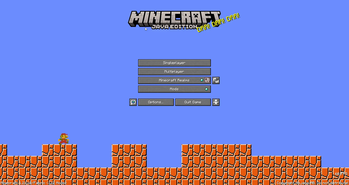
CanvasGLSL
Replace Minecraft's menu backgrounds with custom GLSL shaders. Includes a built-in shader editor with syntax highlighting.
Features
- Live shader editor (press
Insertto open) - Works on all menu screens (title, singleplayer, multiplayer, options, etc.)
- Shadertoy compatible - paste shaders directly from Shadertoy
- Auto-compile or manual compile modes
- File manager for organizing shaders
- Syntax highlighting
Installation
- Install Fabric loader for Minecraft 1.21.10
- Download the latest release JAR
- Put it in your
.minecraft/modsfolder - Launch the game
Usage
Opening the Editor
Press Insert while in any menu to open the shader IDE. Press Insert or Esc to close it.
Writing Shaders
Shaders are saved in .minecraft/canvasglsl/. You can create folders to organize them.
Supported uniforms:
uniform float iTime;- Time in secondsuniform vec3 iResolution;- Screen resolution (width, height, aspect)uniform vec4 iMouse;- Mouse position (x, y, click x, click y)uniform int iFrame;- Frame counteruniform sampler2D iChannel0;- Procedural noise textures (iChannel0 through iChannel3)uniform float iTimeDelta;- Time since last frameuniform vec4 iDate;- Current date/time (year, month, day, seconds)uniform float iSampleRate;- Audio sample rate (44100)
Example shader:
void mainImage(out vec4 fragColor, in vec2 fragCoord) {
    vec2 uv = fragCoord / iResolution.xy;
    vec3 col = 0.5 + 0.5 * cos(iTime + uv.xyx + vec3(0, 2, 4));
    fragColor = vec4(col, 1.0);
}
Using Shadertoy Shaders
- Copy shader code from Shadertoy
- Paste into the editor
- Click "Compile" or enable auto-compile
- Done! The shader will render as your menu background
Controls
Insert- Toggle shader editorEsc- Close editorCtrl+S- Save current shader- Compile button - Compile shader manually
- Auto-compile toggle - Auto-compile on save
- Edition: Minecraft Java
- File type: .jar
- Minecraft version listed: 1.21.4
- How to install: Install the matching mod loader (Forge, Fabric or NeoForge) for your Minecraft version. → Download the .jar. → Put it in the .minecraft/mods folder and launch that loader profile.
- Where to get it: Opens on Modrinth — not every file is mirrored on our own servers.
Install steps are the general flow for this file type — How to install Minecraft Java mods & modpacks walks through it step by step.
- Ships as canvasglsl-1.21.4-0.1.0+mc1.21.4.jar — drop this file into the mods folder
- Download size: 10.1 MB
- Download link checked 12 Oct 2026 — working
These come from our own check of the pack file, not from the source page.