
ModsJava
Fish's Integrated Minecraft
I don't know my version or loader
Open the Minecraft launcher and look at the profile you play on — it names both, like fabric-loader-1.21.4. The version also shows in the bottom-right corner of the game's main menu.
No loader in the profile name? Then it's plain Minecraft, and these mods won't run — you need Fabric or NeoForge installed first.
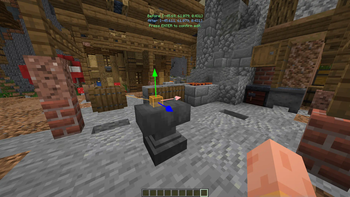
Fish's Integrated Minecraft
Fish's Integrated Minecraft makes coding with Minecraft much faster by adding features that directly correlate to coding in IntelliJ.
✨ Connecting to IntelliJ
Although not required to run the mod, many features require our IntelliJ plugin alongside the mod to function properly!
Main Feature List
- Fast Vector/Location/BoundingBox accessing & editing
- Minecraft world utilities
- Quick block copying (Location, Center, Blockstate...)
- Shortcut for quick swapping between IntelliJ & Minecraft
Planned Features
- Entity & Player world utilities (Copying UUIDs, Positions, etc.)
- Customizable IntelliJ trigger classes for projects
- Viewing Vectors/Locations from classes in Minecraft automatically
- ResourcePack-related features
- and more!
Quick facts
- Edition: Minecraft Java
- File type: .jar
- Minecraft versions listed: 1.21.6, 1.21.7, 1.21.8
- How to install: Install the matching mod loader (Forge, Fabric or NeoForge) for your Minecraft version. → Download the .jar. → Put it in the .minecraft/mods folder and launch that loader profile.
- Where to get it: Opens on Modrinth — not every file is mirrored on our own servers.
Install steps are the general flow for this file type — How to install Minecraft Java mods & modpacks walks through it step by step.
Verified by MCModsHub
- Ships as FIM-Fabric (1.21.6-1.21.8)-0.5.1.jar — drop this file into the mods folder
- Download size: 286 KB
- Download link checked 1 Sept 2026 — working
These come from our own check of the pack file, not from the source page.