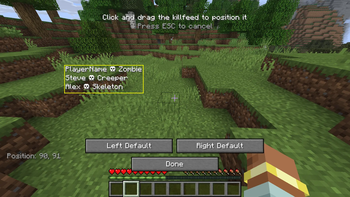
This is a simple mod that adds a traditional fps game kill feed into Minecraft.
This was initially made just for single-player use on a raining mobs challenge video. Where I gave the mobs subscriber/member names https://www.youtube.com/watch?v=l9uzyX7wtak
But have since made it its own mod and added multiplayer support.
Both the client and server need the mod installed for use on a server.
This mod will be actively maintained only for the latest supported Minecraft version. Older versions may be updated, but it's not guaranteed.

Commands
Clients can change where the kill feed is positioned on screen through the killfeed positioning editor. Accessed via the "K" key bind (configurable in controls). Click and drag the kill feed to place it anywhere on the screen!
"K" key - Killfeed position editor
What appears on the kill feed can be adjusted through commands
/killfeed toggle - enables/disables the kill feed. Enabled by default.
/killfeed nonamed - toggles whether the kill feed should show standard entity names for mobs or not. e.g. "Player killed Creeper" otherwise, only NAMED entities appear in the kill feed. Enabled by default.
/killfeed pvp - toggles whether the kill feed shows player vs player kills. Enabled by default.
/killfeed entityvsentity - toggles whether the kill feed shows other entity vs entity kills. e.g. "Wolf killed Sheep". Enabled by default
/killfeed status - shows the status of all settings
Players in a single-player world or server Op's can change these settings.
All of these settings can be adjusted in the config files as well.
Permissions
This mod is All Rights Reserved.
✅ Allowed:
Use in public or private modpacks with proper credit
Showcase in videos, livestreams, or other content
Share links to the official download page
❌ Not Allowed:
Redistributing the mod files on other sites without permission
Modifying, decompiling, or reusing the code/assets
Claiming ownership of the mod
If you’re unsure about something, feel free to contact me
Contact
For further questions or updates, join the discord and contact me @Angel6T4
I make mods mostly for use in YouTube videos. So if you want to further support me, check out my YouTube Channel or Patreon
- Edition: Minecraft Java
- File type: .jar
- Minecraft version listed: 1.21.7
- How to install: Install the matching mod loader (Forge, Fabric or NeoForge) for your Minecraft version. → Download the .jar. → Put it in the .minecraft/mods folder and launch that loader profile.
- Where to get it: Opens on Modrinth — not every file is mirrored on our own servers.
Install steps are the general flow for this file type — How to install Minecraft Java mods & modpacks walks through it step by step.
- Ships as killfeed-2.0.0(1.21.7).jar — drop this file into the mods folder
- Download size: 59 KB
- Download link checked 1 Sept 2026 — working
These come from our own check of the pack file, not from the source page.