
AdiCrafter
This mod adds only one block: the automated crafter.
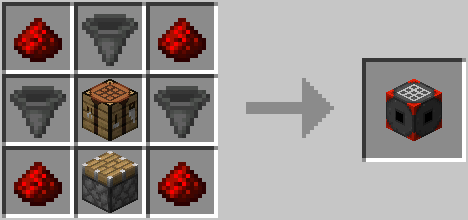
The automated crafter pulls ingredients from neighboring containers and inventories, including chests, hopper and other automated crafters, and any other blocks that implements the Fabric transfer API.
Crafter configuration
You can select the recipe to craft by opening the configuration screen. Simply right-click (use) the block.
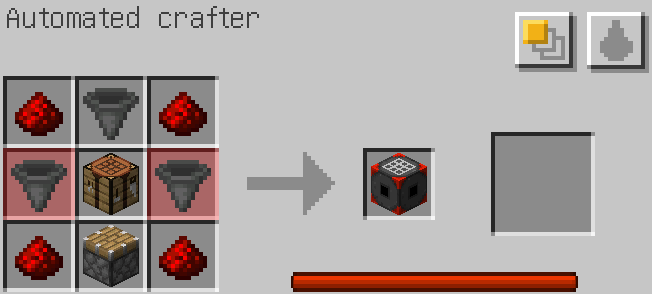
Recipe
Edit the crafting grid on the left. The result of any valid recipe will show on the middle slot, and the right slot can be used to manually craft the recipe.
Note that the right slot will not show anything if there is no enough ingredients available. Missing ingredients are highlighted in the crafting grid.
Fuzzy mode
By default, the automated crafter tries to find the exact items used in its crafting grid, but the "fuzzy" option allows to use any compatible items, e.g. using any kind of plank to craft a chest.
Fluid substitution
There is also an option to replace anything fluid container items (buckets, bottles, ...) by pulling fluids from neighboring tanks, like cauldrons.
This is of limited use with vanilla minecraft, but it can become handy with third-party mods that add a lot of new fluids and recipe.
Internal power
The automated crafter has an internal storage of power that steadily refills over time. Crafting an object consumes some of this power. With the default configuration, a fully-loaded crafter can craft 10 items in a row.
This can be disabled or tweaked in the configuration file.
Activation
The automated crafter will not craft anything unless you try to pull some items from it. You can do so manually, or by using other item extracting blocks, like the hopper.
Mod configuration
The mod reads its configuration from the file config/adicrafter.json. It creates it if it does not exist.
- Edition: Minecraft Java
- File type: .jar
- Minecraft version listed: 1.18.1
- How to install: Install the matching mod loader (Forge, Fabric or NeoForge) for your Minecraft version. → Download the .jar. → Put it in the .minecraft/mods folder and launch that loader profile.
- Where to get it: Opens on Modrinth — not every file is mirrored on our own servers.
Install steps are the general flow for this file type — How to install Minecraft Java mods & modpacks walks through it step by step.
- Ships as adicrafter-0.5.1+mc1.18.1.jar — drop this file into the mods folder
- Download size: 705 KB
- Download link checked 1 Sept 2026 — working
These come from our own check of the pack file, not from the source page.