ModsJava
1.8 Style Inventory
Java mod listed for Minecraft 1.20. Downloads from the MC Java Mods app on Android.
⬇ Download on Modrinth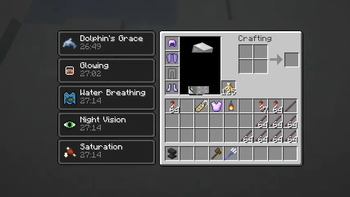
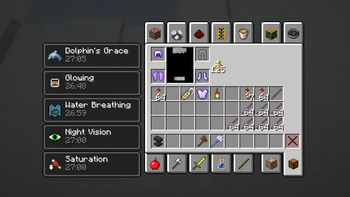
This mod makes the inventory's layout look and feel like Minecraft 1.8.
- Moves the effects to the left, inventory to the right side if you have any status effects, both in creative inventory and survival inventory (Not affacted in 1.17.1 version, as this was changed in 1.18.)
- Restores the Materials tab and hides the Saved Hotbars tab (the hotbar load/save keybinds will continue to work), moves the Misc tab to the top (this is NOT supported in the 1.20.1 version. I had to use a separate mod called Old Inventorism but slightly modified code to get it like in the screenshot)
- Moves the bodyview and armor section to the left side rather than in the center in the Survival Inventory tab.
Known issues:
- the recipe book button's position is wrong if there are status effects.
This mod can be easily ported to Forge since it doesn't depend on Fabric API, only mixins are used.
Quick facts
- Edition: Minecraft Java
- File type: .jar
- Minecraft version listed: 1.20.1
- How to install: Install the matching mod loader (Forge, Fabric or NeoForge) for your Minecraft version. → Download the .jar. → Put it in the .minecraft/mods folder and launch that loader profile.
- Where to get it: Opens on Modrinth — not every file is mirrored on our own servers.
Install steps are the general flow for this file type — How to install Minecraft Java mods & modpacks walks through it step by step.
File checked by MCModsHub
- Ships as Pre_1.12_Inventory-Fabric-1.20.1-1.0.jar — drop this file into the mods folder
- Download size: 17 KB
- Download link checked 12 Oct 2026 — working
These come from our own check of the pack file, not from the source page.