
ZoomW (WAIZA)
The Enhanced ZoomWMod allows players to fine-tune their zoom settings in Minecraft, providing a more immersive and customizable experience. Easily adjust…
⬇ Download on Modrinth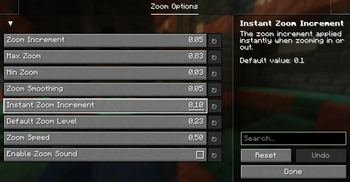




Overview
The Enhanced WAIZA Mod (What Am I Zooming At?) provides Minecraft players with a fully customizable zooming experience, allowing for more precise control over how you view the world. Whether you need to zoom in for a closer look at distant landscapes, or quickly zoom out for a broader view, this mod offers a range of settings that can be fine-tuned to match your preferences. Perfect for adventurers, builders, and anyone who enjoys a more tailored visual experience in Minecraft.

Dependencies
From now on you will need 2 new dependencies to run this mod.
- Mod Menu: This handles the config button.
- YACL: This handles the configuration screen and is a very reliable and thrustworthy mod.
You can find YACL here and Mod Menu here.
Mod Menu Integration
Upon first launch, the mod will generate a configuration file inside Mod Menu. You can access it through the Menu of Mod Menu. Here’s what each setting controls:
zoom_increment: Determines how much the zoom level changes with each scroll or key press. (Default: 0.05)
Description: A lower value allows for finer adjustments, while a higher value makes zooming faster but less precise.
max_zoom: Sets the maximum zoom level you can achieve. (Default: 0.83)
Description: This limits how far in you can zoom. Useful to prevent excessive zooming that might distort the view.
min_zoom: Sets the minimum zoom level you can achieve. (Default: 0.03)
Description: This controls how far out you can zoom, allowing for a wide-angle view of your surroundings.
zoom_smoothing: Controls the smoothness of the zoom transition. (Default: 0.05)
Description: A lower value results in a quicker, more immediate zoom, while a higher value makes zooming feel more gradual.
instant_zoom_increment: Defines the increment for instant zoom adjustments. (Default: 0.1)
Description: Use this setting for faster zoom changes when you need to quickly get closer or further away.
default_zoom_level: Sets the default zoom level that the mod reverts to when you release the zoom key. (Default: 0.23)
Description: This is your “starting point” for zooming, ensuring a consistent and comfortable level of zoom when not actively zooming in or out.

Installation
Install Minecraft Fabric Loader:
Ensure you have the Fabric Loader installed for your version of Minecraft.
Download and Place the Mod:
Download the Enhanced waiza .jar file and place it in your .minecraft/mods folder.
Run Minecraft
The mod will automatically create the configuration file on first run. Tweak the settings to your liking through the in-game Mod Menu.
Languages supported
WAIZA supports the following languages:
- English
- Spanish
- Italian
- French
- German
- More to come...
- Edition: Minecraft Java
- File type: .jar
- Minecraft version listed: 1.21.1
- How to install: Install the matching mod loader (Forge, Fabric or NeoForge) for your Minecraft version. → Download the .jar. → Put it in the .minecraft/mods folder and launch that loader profile.
- Where to get it: Opens on Modrinth — not every file is mirrored on our own servers.
Install steps are the general flow for this file type — How to install Minecraft Java mods & modpacks walks through it step by step.
- Ships as zoommod-0.0.3+(Release).jar — drop this file into the mods folder
- Download size: 27 KB
- Download link checked 1 Sept 2026 — working
These come from our own check of the pack file, not from the source page.