
Mushroom Madness
Java mod listed for Minecraft 1.21. Downloads from the MC Java Mods app on Android.
⬇ Download on Modrinth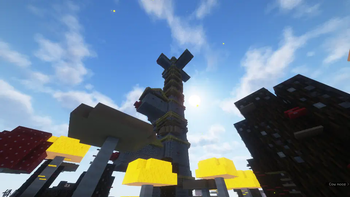

Mushroom Madness aims to update Mushroom Island biomes, giving them the care that they've deserved to get over the years.
Fungal Clumps
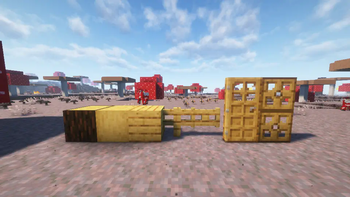
Dropped by Mycelium Overgrowth (A new block similar to short grass), fungal clumps can be placed on logs to convert them into Sporewood Logs, giving access to a new woodset. They also spread on trees, and eat away at leaves.
The Sporewood Forest
Many of the features in this mod spawn inside of the Sporewood Forest, a sub-biome of the Mushroom Fields. This keeps the vanilla Mushroom Fields still feeling like a desolate, peaceful land, while also providing new resources in the immediate vacinity.
Glowcaps
Spawning inside of the Sporewood Forest, these mushrooms are inspired by the glowing mushrooms found within Minecraft Dungeons. By default, they emit a very small amount of light. However, once stepped on, they become a stronger light source. They can be waxed to stay in either state, which also allows them to be placed anywhere your heart desires.
Glowcap Blocks
Similar to the vanilla huge mushrooms, Huge Glowcaps are made up of Glowcap Blocks. Unlike the vanilla huge mushrooms, these blocks create glowing spores in the nearby area, similar to the Spore Blossom. These particles can make for great ambiance in a player's builds.
The Mycologist's Tower
Home of the Mycologist, you may rarely stumble across this structure in the Sporewood Forest. It has several pieces of loot unique to the structure that are worth going for;
- A smithing template that allows players to upgrade their bows with mushrooms
- A bottomless bowl of mushroom stew
- A brand new Music Disc
The Mycologist
A new mushroom bow wielding illager, whose design is inspired by The Mycologists from Inscryption.

- Edition: Minecraft Java
- File type: .jar
- Minecraft version listed: 1.21.1
- How to install: Install the matching mod loader (Forge, Fabric or NeoForge) for your Minecraft version. → Download the .jar. → Put it in the .minecraft/mods folder and launch that loader profile.
- Where to get it: Opens on Modrinth — not every file is mirrored on our own servers.
Install steps are the general flow for this file type — How to install Minecraft Java mods & modpacks walks through it step by step.
- Ships as mushroommadness-1.0.1.jar — drop this file into the mods folder
- Download size: 5.0 MB
- Download link checked 12 Oct 2026 — working
These come from our own check of the pack file, not from the source page.