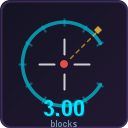
Reach Display
A lightweight client-side Fabric mod that shows the distance of your hits right on the HUD.
What it does
Every time you hit a player or mob, the mod displays the exact distance (in blocks) between you and the target. Useful for PvP practice, understanding combat mechanics, or just satisfying your curiosity.
Features
- Hit distance on HUD — see how far each attack reached
- Fully customizable — change color, position, text scale, label, decimal places
- GUI settings — configure everything through Mod Menu (press N in-game)
- Drag to move — drag the display anywhere on your screen with your cursor
- Commands —
/reachdisplay toggle,/reachdisplay reset,/reachdisplay reload - Config file —
config/reach_display.jsonfor manual editing - Client-side only — no server mod needed, works on any server
- Press "N" for settings
Supported Versions
Fabric: 1.21 — 1.21.11, 26.1
Requirements
- Fabric Loader
- Fabric API
Optional
- Mod Menu (for GUI settings)
Quick facts
- Edition: Minecraft Java
- File type: .jar
- Minecraft version listed: 1.21.1
- How to install: Install the matching mod loader (Forge, Fabric or NeoForge) for your Minecraft version. → Download the .jar. → Put it in the .minecraft/mods folder and launch that loader profile.
- Where to get it: Opens on Modrinth — not every file is mirrored on our own servers.
Install steps are the general flow for this file type — How to install Minecraft Java mods & modpacks walks through it step by step.
Verified by MCModsHub
- Ships as reach-display-1.0.0-mc1.21.1.jar — drop this file into the mods folder
- Download size: 28 KB
- Download link checked 3 Sept 2026 — working
These come from our own check of the pack file, not from the source page.