

Welcome to Fresh Flesh(FF)
You've built a zombie farm to gather XP, but now you're left with tons of useless rotten flesh. So, you install a mod to turn flesh into leather, but eventually, you realize you don’t need it anymore. Not wanting to waste the resource, you add a mod to convert flesh into food, but then you build a golden carrot farm, making that mod obsolete too. Next, you think, "What if I compost the flesh?" but Minecraft doesn't support that feature, and every mod you find either lacks it or comes with a bunch of unnecessary extras.
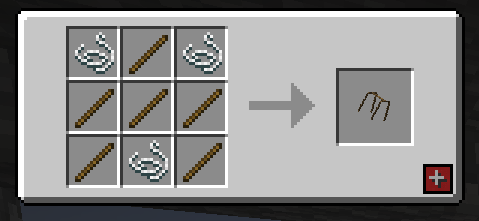
Autorack(1.0.4.0 + ):
Well, guess what? We've got you covered! Fresh Flesh (FF) introduces a brand-new block: the Flesh Rack. Simply place your rotten flesh on this sleek block, then right-click it with your axe—just like stripping bark. This removes all that zombie gunk and leaves you with a clean, usable piece of flesh.
To remove the freshly cleaned flesh from the rack, simply right-click it with an empty hand. Once you've collected your clean flesh, you're ready to start crafting your

To remove the freshly cleaned flesh from the rack, simply right-click it with an empty hand. Once you've collected your clean flesh, you're ready to start crafting your items!
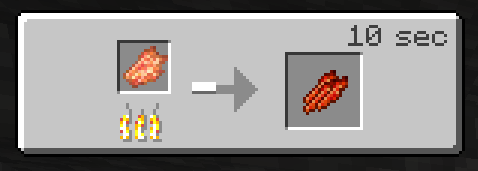
Jerky Cooked on a Campfire
Bone Meal Crafting Table
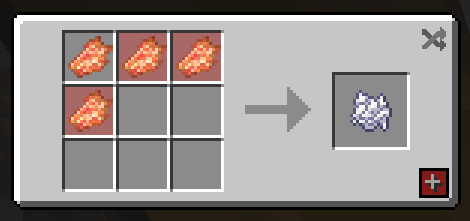
- Composter, Clean Flesh 30% chance to add a stage.
- Composter, Rotten Fless 15% chance to add a stage.
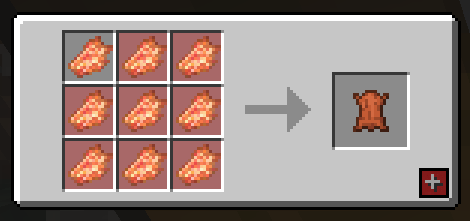
Leather Crafting Table
As a little bonus I also included 2 paintings a 1 block and 4 block versions
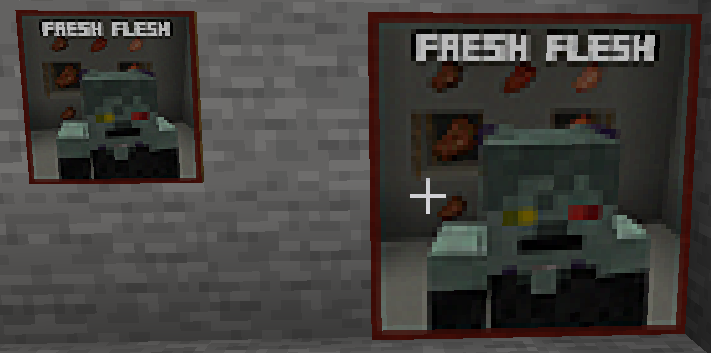 )
)
Features of the Fresh Flesh Mod (FF)
-Flesh Rack Block A new block where you can hang and clean your rotten flesh. Perfect for converting zombie drops into usable resources.
-Rotten Flesh Cleaning Mechanic
- Place rotten flesh on the Flesh Rack.
- Right-click with an axe (similar to stripping bark) to remove the zombie gunk, leaving you with clean flesh.
-Easy Item Retrieval
- Right-click the Flesh Rack with an empty hand to remove the cleaned flesh.
- Right-click the Flesh Rack with you axe to also remove your clean flesh(1.0.3.0).
- If you need that Rotten Flesh back you can also just Right-click it with a empty hand and it will return the Rotten Flesh(1.0.3.0).
-Crafting with Clean Flesh Once you've collected the clean flesh, you can use it to craft various useful items:
- Rotten Flesh to Leather
- Rotten Flesh to Bone Meal
- Rotten Flesh to Jerky (Food)
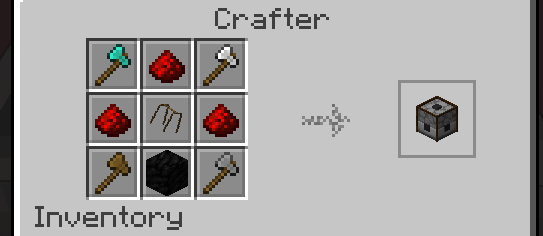
-Autorack(1.0.4.0 + )
- Image below is a 1.21.1 example
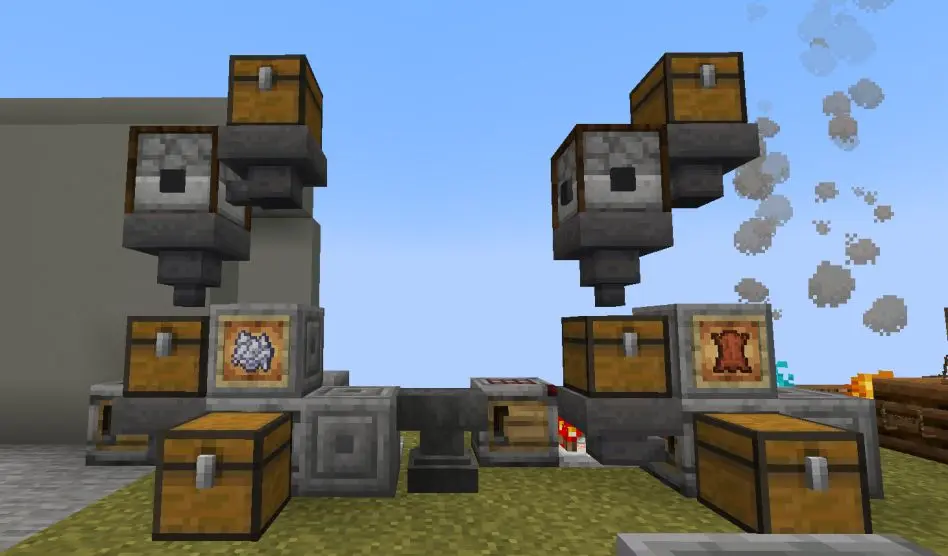
Using Autorack:
- Right click on the Autorack to open it's gui add your rotten flech and in 2 seconds you will have your clean flesh
- hoppers and chests to do this on a large scale, you can also do as the image above where you can create a farm linked to the autorack and then a crafter meaning you can make lether, bonemeal or food.
Social Media
Supporting The Mods?

Would you like to support us? consider our patreon, to help keep our lights on and our tummies full. https://www.patreon.com/TSMUK thanks guys, if you make videos and love our mods, consider making a review video, can't do these two things? then simple, Follow us on twitter, and comment on this page to tell us what you like and dislike about our work.
Most importantly ENJOY yourself.
- Edition: Minecraft Java
- File type: .jar
- Minecraft version listed: 1.21.8
- How to install: Install the matching mod loader (Forge, Fabric or NeoForge) for your Minecraft version. → Download the .jar. → Put it in the .minecraft/mods folder and launch that loader profile.
- Where to get it: Opens on Modrinth — not every file is mirrored on our own servers.
Install steps are the general flow for this file type — How to install Minecraft Java mods & modpacks walks through it step by step.
- Ships as ff_1051_neoforge_1_21_8.jar — drop this file into the mods folder
- Download size: 699 KB
- Download link checked 4 Sept 2026 — working
These come from our own check of the pack file, not from the source page.