
ModsJava
Rulebook
I don't know my version or loader
Open the Minecraft launcher and look at the profile you play on — it names both, like fabric-loader-1.21.4. The version also shows in the bottom-right corner of the game's main menu.
No loader in the profile name? Then it's plain Minecraft, and these mods won't run — you need Fabric or NeoForge installed first.

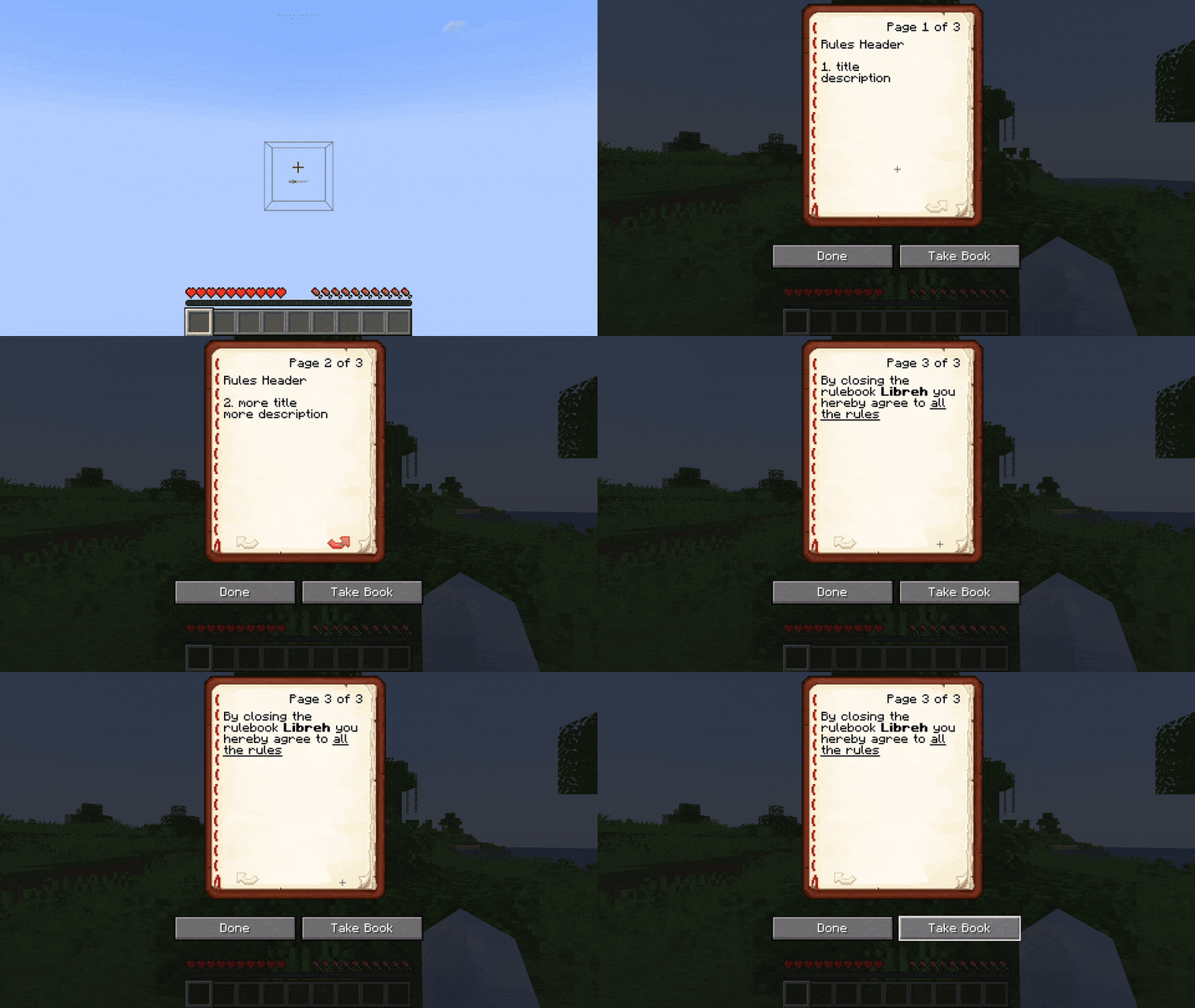
Rulebook
A server-side rules screening mod for Fabric.
Supports Placeholder API, Simplified Text Format, and per player permissions with LuckPerms.
Accept
Reject
Clarifications
You accept the rules by viewing all pages and closing the rulebook.
You can close by clicking the Done or Take Book buttons, or pressing Escape on your keyboard.
The Take Book button will give you an actual in-game rulebook item.
Commands (and permissions):
/rulebookand/rules- Displays the rules in chat (rulebook.main, available by default)/rulebook openand/rules open- Displays the rules as a book (rulebook.main, available by default)/rulebook reload- Reloads configuration (requiresrulebook.reload)/rulebook update- Resets all players' rule status and kicks them, forcing them to accept the rules again (requiresrulebook.update)/rulebook update <players>- Same as above but only for targeted players (requiresrulebook.update)/rulebook update offline- Same as above but only for offline players (requiresrulebook.update)/rulebook accept- Used for accepting the rules (rulebook.main, available by default)
Configuration
// New lines can be added with `\n`!
{
  // Header at the top of each book page and at the top of the rules command
  "rules_header": "Rules Header\n",
  // Rule formatting, supports the variables %rule_number%, %rule_title%, %rule_description%
  "rule_schema": "%rule_number%. %rule_title%\n%rule_description%\n",
  // Displayed at the last page
  "final_page": "By closing the rulebook <bold>%player:name%</bold> you hereby agree to <underline>all the rules</underline>",
  // Messages for when a player is kicked
  "kick_messages": {
    // Player hasn't visited all pages
    "didnt_read": "<red>You didn't read all the rules!</red>",
    // Player's rules have been updated
    "updated_rules": "<yellow>Rules updated, please reconnect</yellow>"
  },
  // All the different rules, each with a title and description
  "rules": [
    {
      "title": "title",
      "description": "description"
    },
    {
      "title": "more title",
      "description": "more description"
    }
  ],
  // List of players that have accepted
  "accepted_players": []
}
Credits
- LilydevMC/Rules [code and inspiration]
Quick facts
- Edition: Minecraft Java
- File type: .jar
- Minecraft versions listed: 1.21.5, 1.21.6, 1.21.7
- How to install: Install the matching mod loader (Forge, Fabric or NeoForge) for your Minecraft version. → Download the .jar. → Put it in the .minecraft/mods folder and launch that loader profile.
- Where to get it: Opens on Modrinth — not every file is mirrored on our own servers.
Install steps are the general flow for this file type — How to install Minecraft Java mods & modpacks walks through it step by step.
Verified by MCModsHub
- Ships as rulebook-0.1.2+1.21.5.jar — drop this file into the mods folder
- Download size: 372 KB
- Download link checked 5 Sept 2026 — working
These come from our own check of the pack file, not from the source page.