

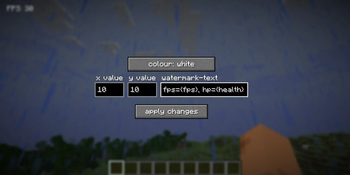


Custom-watermark
This mod adds a customisable watermark to your client that you can modify and edit using the built-in GUI
Keybinds
watermark.gui - Opens the custom-watermark gui (set to the V key by default)
watermark.cycle - Cycles the watermark colour without opening the GUI (set to the / key by default, if it doesn't work please check if / is already bound to something)
Colour options
Here are the colour options currently implemented in the mod, more will be implemented soon...
white
blue
red
blue
green
yellow
orange
pink
pastel red
pastel blue
pastel green
pastel yellow
pastel pink
Custom tags
Custom-watermark has some tags that use in game data to allow for a more customisable gui, here they are:
{fps} - shows the current frames-per-second (fps)
{health} - shows your current player health (including decimal places)
{time} - shows the current time (systemclock)
{date} - shows the current date
{username} - displays your username
{x} - displays your x coordinates
{y} - displays your y coordinates
{z} - displays your z coordinates
{moonphase} - This tag shows the current Moon phase in text form (for example "Full Moon")
{moon} - This tag is basically the same as the {moonphase} tag, but instead displays it as an integer (such as "1" for a full Moon, see the Minecraft wiki here for the full list)
Tag aliases:
{hp} - alias of {health}
{player} - alias of {username}
To show the data, put the tags (with the brackets) in any part of your watermark text. Here is an example:
fps={fps}, health={health}
This will show up as:
fps=144, health=18
The 144 fps and 18 health are just example numbers
Json config
Custom-watermark includes a JSON config file, which can be found in the .minecraft/config folder. This config file is used to store preference data, but can also be used to directly modify the watermark configuration, as an alternative to the GUI
custom-watermark.json
{
"x":10,
"y":10,
"scale":1.0,
"txt":"FPS: {fps}",
"colour":"literal{white}"
}
How to temporarily disable the watermark
To temporarily disable the watermark, remove all of the text from the watermark text bar and press the "apply changes" button
Please feel free to make a Github issue for feature requests
1.0 Notice
To anyone running version 1.0, please note that the mod may come up with the name "pumpkin", as 1.0's mod id wasn't refractored from the original id that came from what this project was initially meant to be (a halloween mod)
Modpack usage notice
You may use this mod for any modpacks, as long as the modpack follows terms of the GPL v3 License this mod uses.
- Edition: Minecraft Java
- File type: .jar
- Minecraft version listed: 1.21.7
- How to install: Install the matching mod loader (Forge, Fabric or NeoForge) for your Minecraft version. → Download the .jar. → Put it in the .minecraft/mods folder and launch that loader profile.
- Where to get it: Opens on Modrinth — not every file is mirrored on our own servers.
Install steps are the general flow for this file type — How to install Minecraft Java mods & modpacks walks through it step by step.
- Ships as custom-watermark-1.4+1.21.7.jar — drop this file into the mods folder
- Download size: 654 KB
- Download link checked 5 Sept 2026 — working
These come from our own check of the pack file, not from the source page.