
This mod makes a small change to the way status effects work.
Default Settings
Normally, consuming a potion (example; 8 minutes of Strength) will set the duration of the effect to 8 minutes, regardless of how many times you drink it, with it being the longest possible within the game.
However, with Additive Statuses installed, these potions will instead add to the total duration of the effect.
Configuration
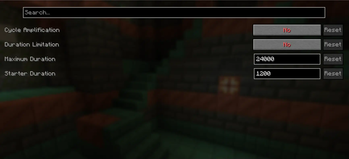
Accessing the config file or using Mod Menu, the following can be done:
Cycle Amplification
When activated, when the duration of an effect hits an indicated "maximum duration", it will set the duration to an indicated "starting duration", while increasing the amplification of the effect by 1.
Specific effects can be blacklisted from this, by default, effects that aren't changed by amplification (e.x; Night Vision) are on the list.
Duration Limitation
When activated, duration of all effects cannot actively exceed the indicated "maximum duration".
- Edition: Minecraft Java
- File type: .jar
- Minecraft version listed: 1.21.1
- How to install: Install the matching mod loader (Forge, Fabric or NeoForge) for your Minecraft version. → Download the .jar. → Put it in the .minecraft/mods folder and launch that loader profile.
- Where to get it: Opens on Modrinth — not every file is mirrored on our own servers.
Install steps are the general flow for this file type — How to install Minecraft Java mods & modpacks walks through it step by step.
- Ships as additive-statuses-0.2.0.jar — drop this file into the mods folder
- Download size: 343 KB
- Download link checked 5 Sept 2026 — working
These come from our own check of the pack file, not from the source page.