
UltimateHotbars
UltimateHotbars lets you break free of the vanilla 9-saved hotbar limit by giving you virtually endless hotbars organized into custom pages that are…
⬇ Download on Modrinth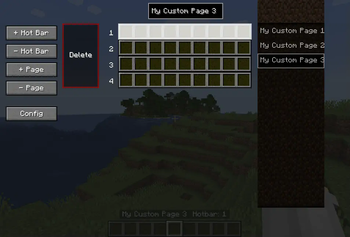
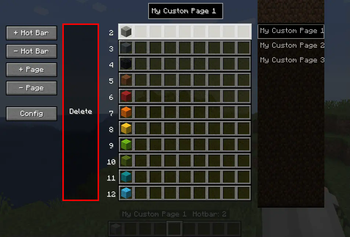
UltimateHotbars
UltimateHotbars is a Minecraft Forge mod (1.20.1 / Forge) that gives you virtually unlimited custom hotbars and pages. Easily switch between them in-game or in any inventory screen, save and restore layouts, and keep your tools, gear and resources organized!
NO longer necessary because V2 now creates a new hotbars.dat file in the world folder and is no longer global. This is the new Version 2 of the mod. Version 1 will no longer be worked on or updated so please switch to the V2 branch/version. In the config menu hit the Purge Data Files button if your comming from V1.x.x as the hot bar data files are not compatable and it will be all messed up. (Sorry you will have to start fresh with your Hot bars.)
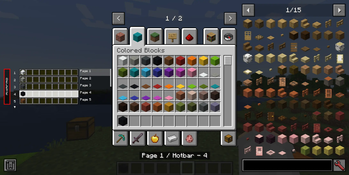
V2.1.x Adds new overlay of hot bars to inventory/container screens. has drag and drop support from the creative inventory or JEI.
🌟 Features
- Virtual Hotbars & Pages
Create up to 100 hotbars per page (configurable), and as many pages as you like. - Peek hotbars popup Hold ALT (by default can be changed) to popup a list of hotbars from the current page. You can click a slot to change to it, page list to switch pages and drag and drop support.
- Hot bars overlay Inventory, chest, anvil ect... you will be able to interact with you hot bars in that screen.
- Seamless Switching
Switch hotbars or pages via keybinds inside the GUI and containers. - Persistent Storage
Your layouts are automatically saved and loaded between sessions. - Quick Clear
Instantly clear the current hotbar with a single key. - Configurable Sounds & HUD
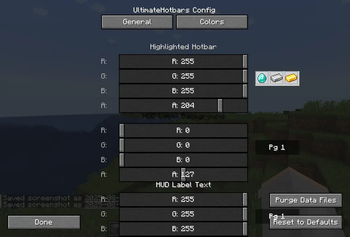
Optional click sounds, on-screen page labels, debug overlay, and color themes.
🎮 Default Keybindings
| Action | Key(s) |
|---|---|
| Open/Close Hotbar GUI | h |
| Next Hotbar | = |
| Previous Hotbar | - |
Next Page (Ctrl + =) |
Ctrl + = |
Previous Page (Ctrl + -) |
Ctrl + - |
| Clear Current Hotbar | Delete |
| Popup for hotbars | Alt |
Tip: You can rebind all of these in the Controls menu.
⚙️ Configuration Options
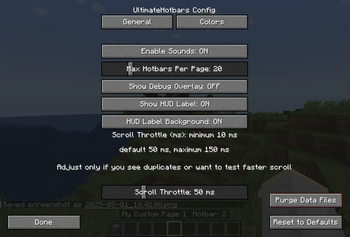
Accessible via the in-game Config button in the Hotbar GUI, or by editing config/ultimatehotbar-client.toml.
| Option | Default | Description |
|---|---|---|
| enableSounds | true |
Play a click/drum sound when switching hotbars or pages. |
| maxHotbarsPerPage | 20 |
How many hotbars each page can hold (1–100). |
| showDebugOverlay | false |
Draws extra debug info (for troubleshooting). |
| showHudLabel | true |
Display “Pg 1/3” style labels on your HUD. |
| showHudLabelBackground | true |
Enable a background behind the HUD label text. |
| highlightColor | [1,1,0,0.8] |
RGBA color for the selected hotbar highlight in the GUI. |
| hudLabelBackgroundColor | [0,0,0,0.5] |
RGBA color for the HUD label background. |
| hudLabelTextColor | [1,1,1,1] |
RGBA color for the HUD label text. |
| hoverBorderColor | [1,1,1,1] |
RGBA color for the slot-hover border in the GUI. |
| scrollThrottleMs | 50 |
delay (10–150 ms) between scroll/key-hold repeats to avoid duplicates. |
- Scroll Throttle
Adjustable delay to prevent duplicate/overwrite when scrolling quickly. you can lower the delay if you really want to but it might mess up your hotbars. If you are getting hot bars copying over eachother then raise this number but default should be ok for most systems this was put in just incase your scrolling faster then your systems I/O.
💡 Usage
- Open the Hotbar GUI with your configured key (default
h). - Add / Remove Pages or Hotbars via the buttons on the left.
- Drag & Drop items in the GUI to rearrange.
- Mouse Scroll or use (default -,=) or ⬆️/⬇️ keys to switch hotbars.
- Mouse Scroll over page list or Ctrl + -/= to flip pages.
- Delete key clears the current hotbar instantly.
- Close GUI with
Esckey. - Popup hotbars press
ALTto quickly see your hotbars and interact with them.
License
This project is licensed under the MIT License—see LICENSE for details.
- Edition: Minecraft Java
- File type: .jar
- Minecraft version listed: 1.20.1
- How to install: Install the matching mod loader (Forge, Fabric or NeoForge) for your Minecraft version. → Download the .jar. → Put it in the .minecraft/mods folder and launch that loader profile.
- Where to get it: Opens on Modrinth — not every file is mirrored on our own servers.
Install steps are the general flow for this file type — How to install Minecraft Java mods & modpacks walks through it step by step.
- Ships as ultimatehotbars-2.0.37.jar — drop this file into the mods folder
- Download size: 107 KB
- Download link checked 5 Sept 2026 — working
These come from our own check of the pack file, not from the source page.