
Better Lost Items
Java mod listed for Minecraft 1.21. Downloads from the MC Java Mods app on Android.
Better Lost Items tracks despawned world drops, saves player death loot, and turns wandering traders into recovery merchants. Configure recovery costs…
⬇ Download on Modrinth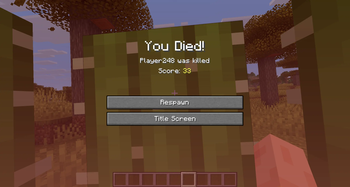
Better Lost Items
Better Lost Items turns Minecraft's saddest little moment, watching your gear vanish forever, into an impermanent, wandering-trader recovery system.
Instead of every despawned item simply disappearing into the void of forgotten pixels, this mod tracks lost loot, saves it to the world, and lets wandering traders become mysterious item-recovery merchants.
What It Does
Better Lost Items adds two big ideas:
- Unclaimed despawned items become wandering trader stock.
- Player death loot can be recovered later through a custom wandering trader tab.
That means random world drops can reappear in trader markets, while items you personally lost after dying are kept in your own recovery cache.
Features
- Tracks unlabeled despawned items and saves them to a server/world file.
- Adds up to 8 lost-world-item trades to wandering traders.
- Removes public lost-item trades permanently after purchase.
- Keeps each wandering trader's market offers stable after they spawn.
- Prevents duplicate item offers in the same trader market.
- Merges stackable unclaimed items so one item type does not flood the trade menu.
- Tags items dropped from player deaths with that player's UUID.
- Saves despawned player death drops to that player's personal lost-loot cache.
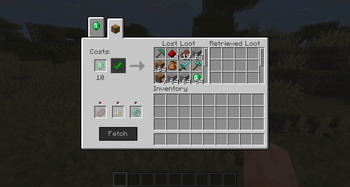
- Adds a custom wandering trader recovery tab for player death loot.
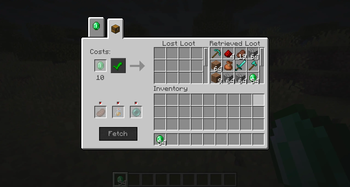
- Lets players pay one flat configured cost to move all lost death loot into retrieved loot.
- Provides a retrieved-loot inventory where players can take items back normally.
- Supports shift-clicking retrieved loot into the player inventory.
- Keeps death-loot stacks separate so multiple stacks of the same item are all recoverable.
- Prevents mobs from picking up player death drops.
- Handles cactus-deleted death loot by sending it directly to recoverable lost loot.
- Tracks death drops in unloaded chunks and lets traders fetch them later.
- Supports special hidden burned loot and void/fallen loot pools.
- Lets players provide extra configured supplies to recover burned or void-lost items.
- Makes fetching immersive: the trader walks away, despawns, and returns the next morning with the loot.
- Spawns a nearby wandering trader after a player respawns if none are close enough.
- Includes admin commands for testing or managing player death-loot caches.
- Includes Mod Menu integration with an in-game config screen.
- Saves config changes live without needing a game restart.
Wandering Trader Market
When normal, unlabeled items despawn, they are saved into the public unclaimed pool.
Wandering traders can then offer those items as trades. These are priced based on the item's rough value, including things like rarity, enchantments, durability, custom names, and stack size.
Once a player buys one of these items, it is removed from the public pool. No item duplication shenanigans here.
Death Loot Recovery
When a player dies, the items dropped from that death are tagged as belonging to that player.
If those items despawn, they are saved to that player's personal lost-loot cache. When the player opens the wandering trader recovery tab, they can see:
- Lost Loot: items waiting to be purchased back.
- Retrieved Loot: items already paid for and ready to collect.
The player pays one configured cost to redeem all currently lost death loot at once. By default, this is 10 emeralds.
Fetch Journeys
Sometimes death loot is not gone yet. It is just sitting far away in unloaded chunks.
The Fetch system lets a wandering trader go retrieve that loot:
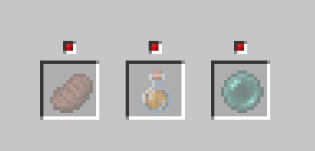
- The player places the required journey supplies in the fetch slots.
- The player presses Fetch.
- The wandering trader walks away and despawns.
- The mod scans tracked death-loot chunks and gathers matching items.
- The next Minecraft morning, a wandering trader returns nearby.
- The fetched loot becomes available in the player's Lost Loot list.
Optional fetch supplies can also recover:
- Burned Loot: death items destroyed by fire or lava.
- Void Loot: death items deleted by falling into the void.
Both of these systems can be enabled, disabled, and customized.
Config
Better Lost Items creates a config file:
config/better_lost_items.json
If Mod Menu is installed, you can open the config screen in-game and edit everything live.
Configurable options include:
- The item used to pay for death-loot recovery.
- The amount required for death-loot recovery.
- Whether the fetch system is enabled.
- Whether fetch uses food or a custom item for journey supplies.
- The custom journey item, potion type, and amount.
- Whether burned loot can be recovered.
- The burned-loot fetch item, potion type, and amount.
- Whether void loot can be recovered.
- The void-loot fetch item, potion type, and amount.
Changes made through the Mod Menu config screen are saved immediately and take effect without restarting the game.
Commands
Players with cheats/operator permissions can use:
/deathlootcache <player> clear
/deathlootcache <player> add
/deathlootcache <player> list
Command behavior:
clearremoves all cached death loot for the selected player.addmoves the selected player's current inventory into their death-loot cache.listprints the player's cached lost, retrieved, burned, fallen, and pending fetch loot.
These are especially useful for testing the recovery UI.
Installation
- Install Fabric Loader for the supported Minecraft version.
- Install Fabric API.
- Put the Better Lost Items jar into your
modsfolder. - Optional but recommended: install Mod Menu to edit the config in-game.
The built jar is created with:
./gradlew build
Then use the jar from:
build/libs/better-lost-items-1.0.jar
Notes
Better Lost Items stores world-specific lost-item data inside the world save folder. That means each world/server keeps its own lost item pools.
The mod is designed around server-side authority for storage, trades, recovery, and fetch behavior. Clients mostly handle rendering screens and sending button/scroll requests.
Why?
Because losing items forever is painful.
Because wandering traders needed a better job.
- Edition: Minecraft Java
- File type: .jar
- Minecraft version listed: 1.21.1
- How to install: Install the matching mod loader (Forge, Fabric or NeoForge) for your Minecraft version. → Download the .jar. → Put it in the .minecraft/mods folder and launch that loader profile.
- Where to get it: Opens on Modrinth — not every file is mirrored on our own servers.
Install steps are the general flow for this file type — How to install Minecraft Java mods & modpacks walks through it step by step.
- Ships as better-lost-items-1.3.jar — drop this file into the mods folder
- Download size: 177 KB
- Download link checked 15 Oct 2026 — working
These come from our own check of the pack file, not from the source page.