
OverlayWardrobe Mod
The OverlayWardrobe mod is a fantastic addition for Minecraft Fabric, designed to give players unparalleled control over their in-game appearance. It introduces a seamless and intuitive way to customize your character's look without the need for complex file manipulations or external tools.
Version
1.20.1 done, 1.21.x planned
Key Features
The core of the OverlayWardrobe mod revolves around its user-friendly accessibility and instant customization:
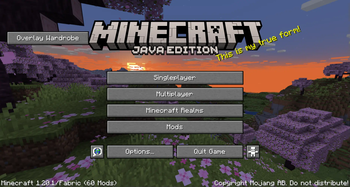
- Main Menu Integration: Upon launching Minecraft, you'll find a new, dedicated button directly on the main menu. This ensures that accessing the mod's features is always quick and straightforward.
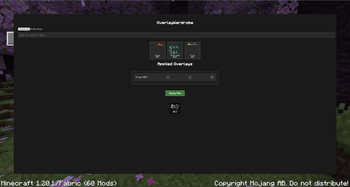
- Extensive Catalog: Clicking the button opens a comprehensive catalog filled with a variety of pre-added skin overlays. These overlays can range from different clothing styles and armor aesthetics to unique accessories, allowing for diverse personalization options.
- Easy Toggling: Within the catalog, you can easily toggle these overlays on or off. This means you can mix and match different elements, experiment with various combinations, and see how they look in real-time.
- Instant Skin Update: Once you've made your selections and are satisfied with your chosen overlays, the mod instantly updates your in-game skin. There's no need to restart your game or navigate through multiple menus; your new look is applied immediately.
Why Use OverlayWardrobe?
OverlayWardrobe is perfect for players who love to express themselves through their character's appearance. Whether you want to roleplay a specific character, match your outfit to your current in-game biome, or simply enjoy changing your style on a whim, this mod provides a convenient and powerful solution. It streamlines the process of skin customization, making it more accessible and enjoyable than ever before.
- Edition: Minecraft Java
- File type: .jar
- Minecraft version listed: 1.20.1
- How to install: Install the matching mod loader (Forge, Fabric or NeoForge) for your Minecraft version. → Download the .jar. → Put it in the .minecraft/mods folder and launch that loader profile.
- Where to get it: Opens on Modrinth — not every file is mirrored on our own servers.
Install steps are the general flow for this file type — How to install Minecraft Java mods & modpacks walks through it step by step.
- Ships as OverlayWardrobe-1.8-1.20.1.jar — drop this file into the mods folder
- Download size: 4.3 MB
- Download link checked 5 Sept 2026 — working
These come from our own check of the pack file, not from the source page.